Welcome to WinMagic’s Documentation & Knowledge Base
This is your home for technical manuals, setup guides, and help articles. Here you can browse our library of expert resources, find answers to common questions, and access deep-dive documentation for your organization.
Security or User Experience?
Why settle for one, when you can have both.
MagicEndpoint is better at both security and user experience than other solutions. This is a result of novel, correct thinking.

No User Action
The endpoint verifies the user (with local MFA, more accurately than any server could), then performs online authentications on the user behalf, magnitudes more securely than users themselves. No user action is required.

Inherently Resistant to Phishing and AI Based Attacks
With no user action involved, there is nothing for attackers to phish or manipulate using AI. The most secure solution is often the simplest. Without user interaction, the attack surface is reduced.

Zero Trust, Redefined and made real
Zero Trust requires continuous verification of user, device, application, and transaction. By anchoring identity to user on device, in real time, MagicEndpoint enables continuous verification using event driven updates and persistent checks before, during, and after login, without requiring user action.

Rethinking Identity, Who Are We Authenticating?
Instead of merely verifying the user, we verify the user on device, in real time. MagicEndpoint unlocks stronger security and better productivity by shifting identity verification to the endpoint.
Built for trust.
Designed for simplicity.
Designed for simplicity.
Device root of trust, identity cryptographically protected, under the hood authentication.
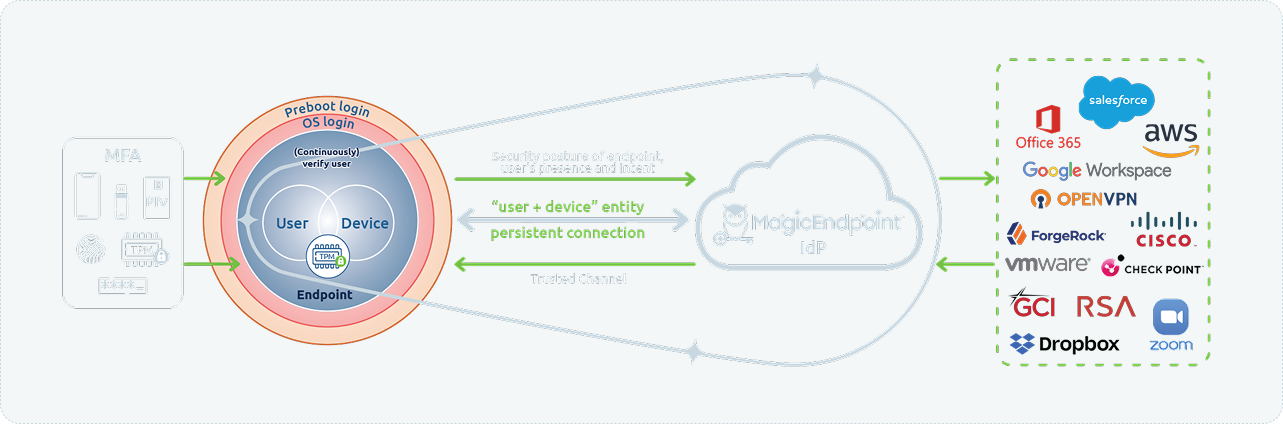
Endpoint Access
Verify users at preboot or Windows login before accessing online resources. Users authenticate with the most comprehensive MFA methodologies available in the market today.
Root of Trust
Once authenticated, the Trusted Platform Module (TPM) protects the User on Device in Real Time identity. It protects identity from hackers, ensuring only authentic user on authentic device can access online resources.
Secure Online Access
Ensures only verified users and trusted devices can connect to digital resources, protecting against unauthorized entry and data breaches. This access is seamless and automatic, requiring no passwords, prompts, or user action after device login.
Persistent Connection
Maintains an always on, secure communication link between the endpoint and the IdP, enabling real time monitoring and rapid response to any anomalies. This continuous link allows seamless, user transparent verification without repeated logins or authentication prompts.
Trusted Channel
Think of the trusted channel like the phone number on the back of your bank card. Like the bank, the IdP has a trusted mechanism to ensure it is communicating with the authentic device and not with a hacker.