Installing SDLinux on FIPS validated Systems
About SDLinux FIPS Validation
To understand how SDLinux Full Disk Encryption (FDE) is able to achieve FIPS Compliance we need to first understand the components of FDE itself.
Full Disc Encryption has two components:
Authorization Acquisition
Responsible for authentication of the user
WinMagic software (SDLinux) is responsible for the Authorization Acquisition
Encryption Engine
Responsible for encrypting data
Linux OS is responsible for the Encryption Engine (dm-crypt)
Both components need to use validated modules from NIST so it can be considered as compliant with FIPS.
Since the SecureDoc for Linux cryptographic module is FIPS 140 validated (See certificate link here) and always in FIPS mode, this ensures that the authorization acquisition component is compliant. To ensure the Linux OS, the encryption engine component, is in FIPS mode see – Deploying on FIPS mode enabled systems or if you have a customized set-up see the next section “How does SDLinux FDE achieve FIPS Compliance?” for more information.
Note: NIST does not validate an entire product that provides the Full disk encryption (in this case SDLinux), in fact NIST does not deal with this at all, it only deals with validation of modules itself that provide cryptography. You will not find a disk encryption product in the NIST validated modules web page.
How does SDLinux FDE achieve FIPS Compliance?
FIPS compliance of SDLinux FDE solution comes down to the following:
https://csrc.nist.gov/projects/cryptographic-module-validation-program/certificate/4192
The Red Hat or Ubuntu Cryptographic module is listed to have an active 140-2 certificate (See How to verify Cryptographic modules are FIPS validated)
dm-crypt has to be configured to use a listed FIPS validated module.
Note: Configuring/setting-up dm-crypt to use only FIPS validate modules for encryption requires a lot of knowledge and know how of dm-crypt so it may not be ideal for most use cases.
If you are looking for a simpler way to achieve this (without configuring dm-crypt directly), Red Hat and Ubuntu recommends installing or enabling FIPS mode on their operating system as this helps ensure that the OS are using FIPS validated cryptographic packages/components. See Deploying on FIPS mode enabled systems for more info
If the Security Policy of the selected module specifies any steps necessary for the module to operate in FIPS-mode then that has to be done prior to SDLinux deployment
There are no settings or flags that are required to be configured on the SDLinux Profile/Package itself. When SDLinux is deployed to the system it uses whatever configuration dm-crypt is using or has been configured to in the operating system.
How to verify Cryptographic modules are FIPS Validated?
To verify if the cryptographic modules you have installed are FIPS validated, you can search for the module on the link below. You can also set your search results for a particular vendor.
https://csrc.nist.gov/projects/cryptographic-module-validation-program/validated-modules/search
Example:
Searching for the Vendor: Red Hat will yield the following results
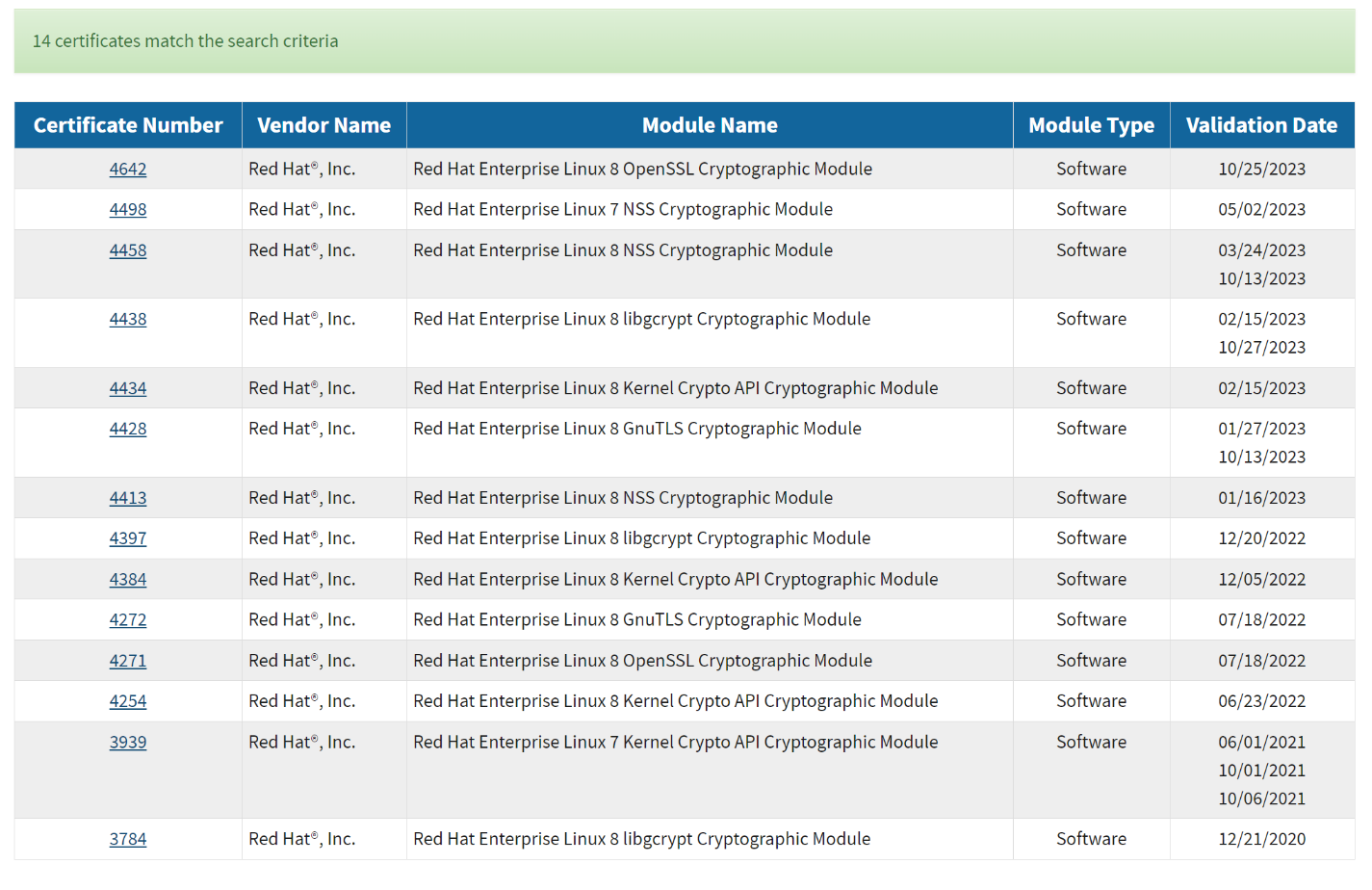
You can also check Red Hat and Ubuntu’s website for the list of modules that they currently have active certificates for:
Deploying on FIPS mode enabled systems
SDLinux supports installation and encryption of Linux operating systems that have FIPS mode enabled. This support allows SDLinux to be deployed on systems that are aiming for their systems to be FIPS compliant.
There are two ways to enable FIPS mode on RedHat systems:
Start the installation in FIPS mode
Switch the system into FIPS mode after the installation
While there are two methods to enable FIPS mode RedHat does recommend, if the aim is for FIPS compliance, it is best to start the installation in FIPS mode.
Instructions on starting your RedHat installations in FIPS mode can be found on the links below:
For any version not listed above you can visit Red Hat’s website (https://docs.redhat.com/en/documentation/red_hat_enterprise_linux) and look in the Security section of the documentation for the OS version you are looking for.
Instructions on switching the system to FIPS mode after installation can be found on the link below:
https://access.redhat.com/solutions/137833
Note: The link above provides again another warning that if the aim is for FIPS compliance it is ideal for new machines to be installed from scratch with FIPS enabled. Please consult with your respective RedHat representative if you have any concerns with achieving FIPS compliance on an already existing RedHat system
To enable FIPS on Ubuntu, you will first need:
An Ubuntu Pro subscription. You will need this subscription attached to your Ubuntu system in order for it to have access to FIPS-validated cryptographic packages that includes the Linux kernel and OpenSSL.
The Ubuntu OS version is listed as FIPS certified under Ubuntu’s Certification & Hardening section of their website (See Ubuntu’s website https://ubuntu.com/security/certifications/docs/fips for more info).
Instructions on how to attach an Ubuntu Pro subscription as well as how to enable FIPS can be found on the link below:
https://ubuntu.com/security/certifications/docs/fips-enablement
Other FAQ About FIPS Validation
Is dm-crypt only FIPS certified for RedHat OS? If so how is FIPS certification achieved in other Linux OS like Ubuntu?
dm-crypt itself is not FIPS certified, however what is important is that the cryptographic modules and algorithms it uses are FIPS validated modules.
So for OS’s like RedHat and Ubuntu, which has FIPS validated cryptographic modules, dm-crypt may use one of them providing the OS has been configured in FIPS-mode and abides the Security Policy of the module. Alternatively, dm-crypt may be redirected to properly install standalone OpenSSL cryptographic module that has active FIPS 140 certificate published by NIST CMVP. In this case the requirement of selecting FIPS-mode is applied directly to the module rather than to the whole OS. See “How does SDLinux FDE achieve FIPS Compliance?”
Is there a specific version of OpenSSL that SDLinux requires to be installed on a system?
Assuming that dm-crypt uses OpenSLL cryptography, SDLinux does not require any specific version to operate. However, if FIPS compliance of the FDE solution is required then OS shall include an OpenSSL version with active FIPS 140 certification (3.0.8 or 3.0.9).
Does the FIPS validation for SecureDoc for Linux work similar to SecureDoc for Windows?
The approach in both cases is the same, i.e. only FIPS 140 validated cryptography shall be used by the FDE solution.
But while for SecureDoc for Windows validation of SecureDoc Cryptographic Engine is sufficient, SDLinux would also require that the cryptographic module from Operational Environment used by dm-crypt was validated as well and operated in FIPS-Approved mode as described earlier.