Enable debug level 5 before installation for Windows
Environment: Windows
Summary: The script will create a registry entry to enable debug log level 5. This registry value only debugs the software activation. I.e.: communication, install of boot logon, encryption but not the extraction of software that is done via MSI or exe extracted to MSI.
NOTE: The login user must have local administrator right to modify the registry.
Procedures:
Step 1:
Create in Notepad the following registry lines:
Windows Registry Editor Version 5.00
[HKEY_LOCAL_MACHINE\SOFTWARE\WinMagic]
"DebugEnabled"=dword:00000005
Step 2:
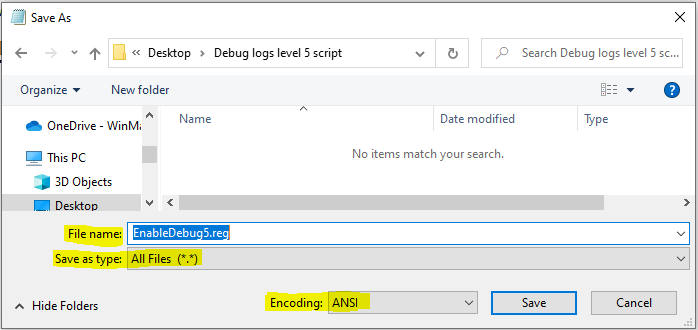
Save as with the following information as shown below.
File name: EnableDebug5.reg
Save as type: All Files (*.*)
Encoding: ANSI
Step 3:
Run the Registry file.
Step 3:
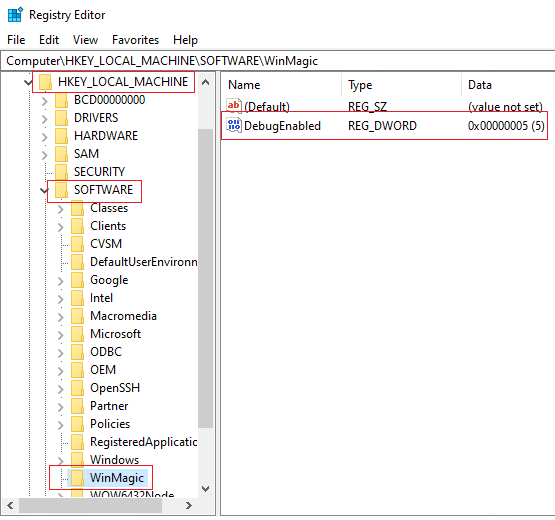
Verify the Registry entry exist located at [HKEY_LOCAL_MACHINE\SOFTWARE\WinMagic] before and after the reboot.
Step 4:
Install SecureDoc.