Enable level 5 debug logs in OSA USB installation package
Environment:
OSA
Ubuntu
- Open \boot\grub\menu.lst for edit (on Linux, Windows; wherever is convenient) from bootable USB with OSA installer.
- Right-click and open with Notepad for Windows OS.
- Locate existing text the following fragment is beginning with and add the following line:
### existing text
if [ "$grub_platform" == "pc" ]; then
set add_param="wmsd_efi_boot=0"
else
set add_param="wmsd_efi_boot=1"
fi
### new line to add:
set add_param=$add_param" wmsd_log_level=5 wmsd_debug_options=2"
### existing text
# The following GRUB2 menu item specifies that OSA client configuration files located on the USB memory stick
menuentry 'Winmagic OS agnostic installation manager. Local package.' {
See example below.
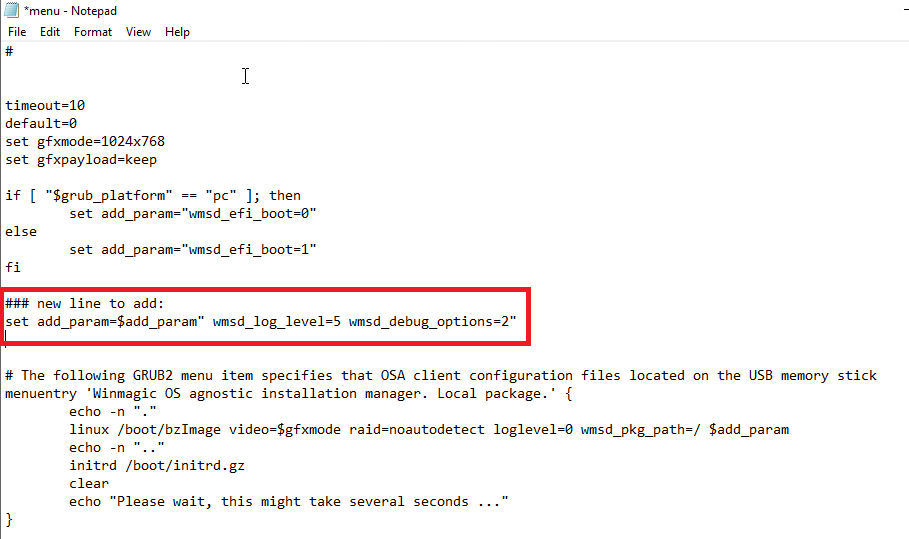
- Save changes.
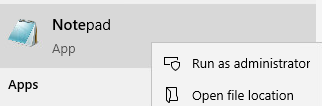
- Run a Notepad as administrator.
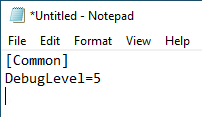
- Type in the following as shown below.
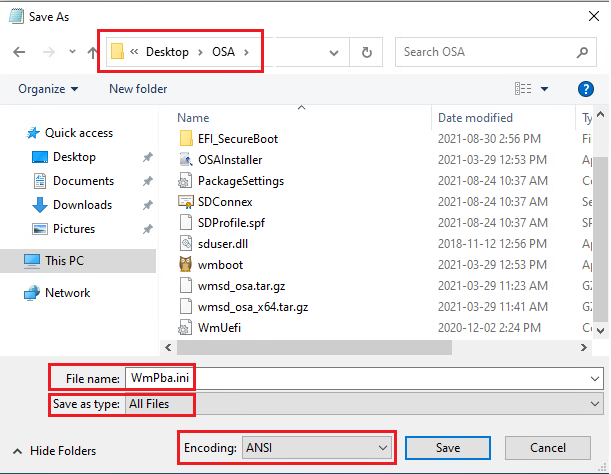
- Click File and Save as. Browse to the location of the OSA installation Package (e.g., USB Drive).
- File Name: WmPba.ini
- Save as type: All Files
- Encoding: ANSI
- Example below:
- Click Save.
- Use the USB to install OSA.
- Pick up InstallApp.log from root folder of the USB and send it to us.
NOTE: The debug level is set up in two locations and it is redundant. The reason being is if one of those settings did not work then the other configuration should work. Another reason is that the menu list won't work for OSA installer running from Windows.
Charles chicm
Win Magic Profile windows and linux
Diplay to display