This article describes how to remove SecureDoc boot logon by changing a Windows registry setting.
You may need to do this if you are unable to remove SecureDoc by using Add/Remove Programs in Windows.
You should only do this if it is not possible to remove boot logon via the SecureDoc Control Center.
WARNING: Ensure that the device is NOT encrypted before attempting this procedure.
Removing boot logon while a machine is still encrypted will prevent you from accessing your device normally.
- Open the Windows registry
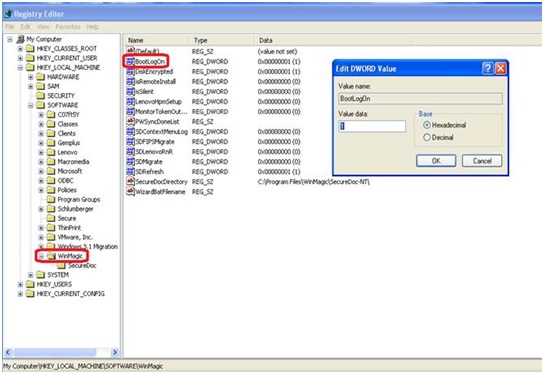
- Navigate to HKey Local Machine>Software>WinMagic
- Change the BootLogOn value from 1 to 0 (see screen shot below).
- Restart (or re-boot) the device.
Custom Fields
Version: Affects all versions of SD