KB# | 1780 |
Title | How to setup Securedoc on a Dell Precision 7530 |
URL Name | How-to-setup-Securedoc-on-a-Dell-Precision-7530 |
Summary | As the Dell Precision 7530 does have certain important factors which needs to be taken into consideration during the process of installing SecureDoc successfully on this specific model, our support team has prepared an informational guideline which is specifically includes special instructions to ensure successful deployment for this specific model |
Topic:
As the Dell Precision 7530 does have certain important factors which needs to be taken into consideration during the process of installing SecureDoc successfully on this specific model, our support team has prepared an informational guideline which is specifically includes special instructions to ensure successful deployment for this specific model. Note: Please also refer to the attached compatibility test result included in this article
For Windows UEFI set to use SD PBU (e.g. Windows 8, 8.1, 10 etc.):
When running SES 8.2 or higher version in production:
- You will need to download the “knownconfig.xml” from article 1745 and replace the existing version that’s within your installation package. See 1747
- You can then run SecureDoc installation on endpoint device.
The specific knowconfig.xml is used to automatically apply special SecureDoc settings that will allow successful deployment of SD pre-boot work on device.
When running SES 7.x version in production:
- You will need to download the “knownconfig.xml” from article 1746 and replace the existing version that’s within your installation package. See 1747
- You can then run SecureDoc installation on endpoint device.
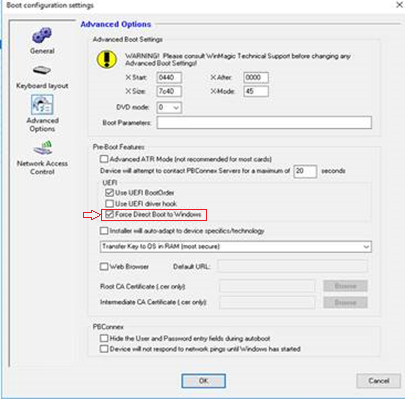
From your Profile – Under BootConfiguration >> Advanced settings:
- Please enable Force Direct Boot to Windows
e.g.
Windows UEFI set to use SD PBLU (e.g. Windows 8, 8.1, 10 etc.):
When running SES 8.2 or higher version in production:
- You will need to download the “knownconfig.xml” from article 1745 and replace the existing version that’s within your installation package. See 1747
- You can then run SecureDoc installation on endpoint device.
The specific knowconfig.xml is used to automatically apply special SecureDoc settings that will allow successful deployment of SD pre-boot work on device.
When running SES 7.x version in production:
- You will need to download the “knownconfig.xml” from article 1746 and replace the existing version that’s within your installation package. See 1747
- You can then run SecureDoc installation on endpoint device.
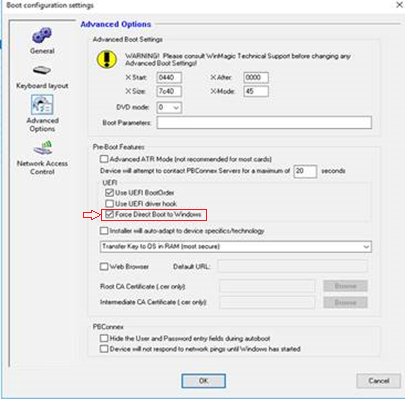
From your Profile – Under BootConfiguration >> Advanced settings:
- Please enable Force Direct Boot to Windows
e.g.
Important: If you have NVMe drive in the Dell 7530 then, then you will want to ensure that the SATA operations mode is set to AHCI and not RAID. By default, Dell ships the NVMe drive setup in RAID mode.
If you do not make this change prior to installing SecureDoc, then the setup with PBLU will fail to launch in which error generate an error (error1).