The following article provides troubleshooting information towards addressing issue in which user observed getting “Database logon failed” when trying to create reports in SES Web.
Scenario Example:
The following scenario example outlines what the user encounters:
- Client is able to successfully to login to SES Web
- Client clicks on Reports
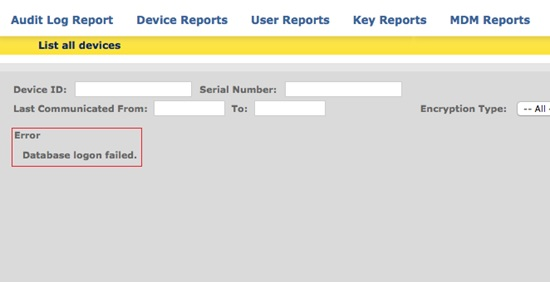
- When attempting to generate report type, the error is generated “Database logon failed” upon selecting a specific report.
Screenshot example showing user attempting to perform a device report -> List all devices.
Proposed Solution:
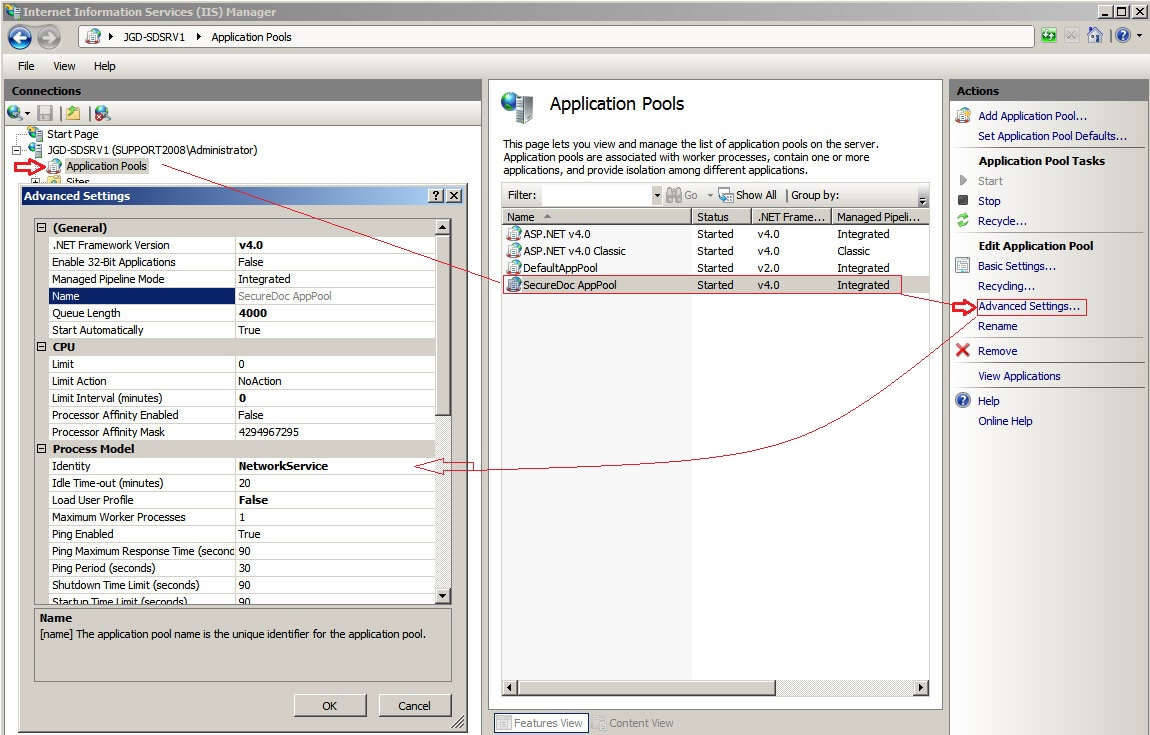
Client will need to review the setting with the Application Pool Identity area of IIS Manager:
- If both SES and SQL Database are on the same server:
You can use the Local Server/ Local system account.
- If separate servers are configured for your SES Server and Databse:
You can use same account as SD Connex
Other Troubleshooting:
- In the event, that the above proposed solution still does not address the issue, your will need to review your current version of .net Frameworks being used. For further information, please refer to KB 1644 for this troubleshooting step.