Issue:
Client may have installed SES under different directory than typical C: drive.
When accessing the SES Web, client may experience "HTTP error 500.19 - Internal Server Error", and may have the sub-message "The requested page cannot be accessed because the related configuration data for the page is invalid." This indicates problems with certain permissions within the IIS server.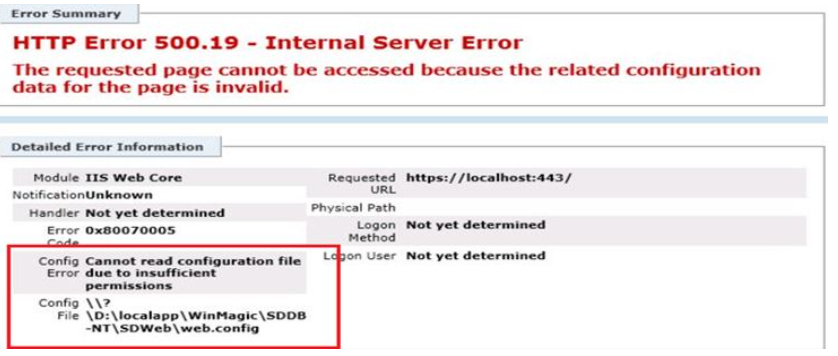
Product version affected:
SD 6.1 and up
Environment (OS/hardware/software):
Windows OS Servers
Solution/Workaround:
Step 1:
Please make sure that the SESWeb is properly configured based on the KB 1483 "How to Setup SESWeb" article.
Step 2:
Look for SDWeb folder from C:\program files\Winmagic\SDDB-NT folder and grant extra permission to users.
Provide the Read & Execute, List Folder Content, and Read permission to the account in questioned. Please see below: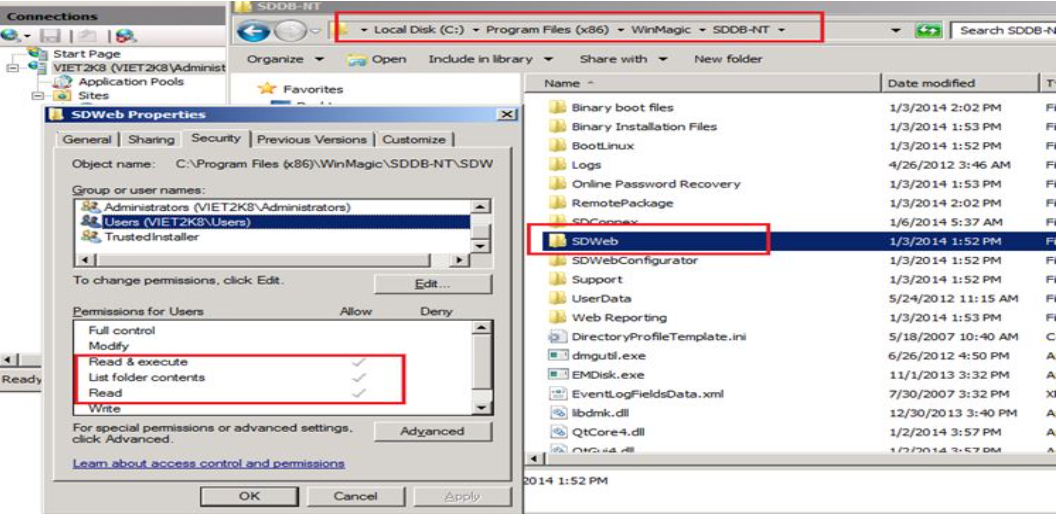
1485 (HTTP error 500.19 - Internal Server Error) When Accessing SESWeb
- Updated on Feb 11, 2026
- 1 minute(s) read
- VN
Was this article helpful?