Why am I getting B1initialize.Library failed 0xc00000bb after installing SecureDoc?
After completing an install of SecureDoc and the device restarts the device, the user will see a black screen upon restart with B1InitializeLibrary failed 0xc00000bb error and no longer able to launch Windows Operating System.
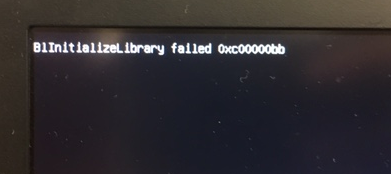
Issue Reported in:
SecureDoc 7.1 SR5 running Windows 10 RS2 [Creators Edition]
Probable Cause:
We suspect that error is consistent with a BSOD event in other devices in which they will see a Recovery Screen will showing 'Your PC needs to be repaired'.
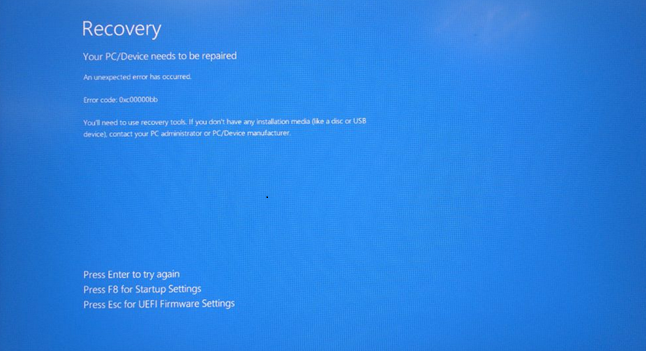
Typically we’ve seen this error occur relating to an older version of SecureDoc and running Windows 10 Creators Editions in which Driver bindings changes may need to be applied.
Suggested Resolution:
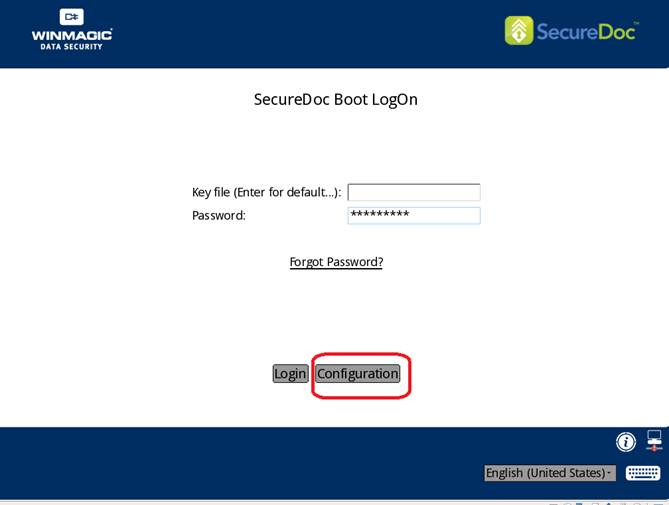
To change driver hook settings at Preboot Login Screen, you will need to use PBU screen. If PBLU is enabled, you can then tap ‘a’ key to revert to PBU:
- Enter your Username\Password and press F3 key
- Click on “Configuration”
- Change “DriveBinding” option to No
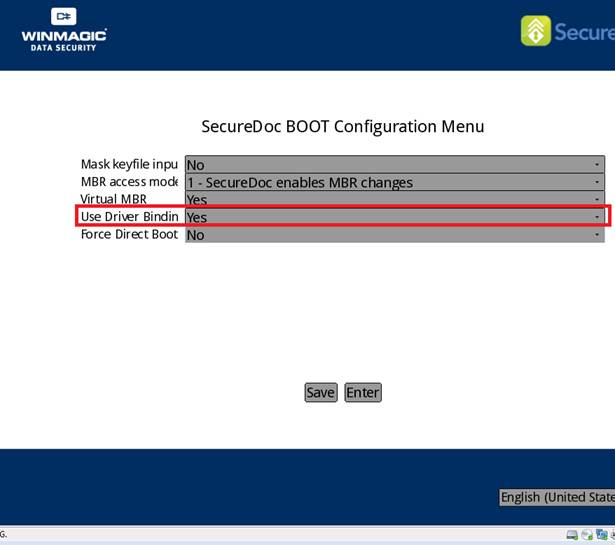
Once the system gets the black screen showing 0xc00000bb 0x0c00000bb), Windows should attempt to load, Please make sure to install new version of SecureDoc [v7.1 SR6] to fully support Windows 10 RS2.
In the event you encounter any other issues not covered in this document, you may want to refer to Article 1685 or contact our Support team for further assistance.