Topic:
This How-To article outlines the steps on how to import the *.sdi machineinfo file from a device to the SES console.
Purposes:
- Customer wants to manage offline installed devices on the SES console
- Device may have been permanently deleted from the SES console and is unable to communicate with the SES server
- For the purpose of device recovery (user password, self-help questions, emergency disk, hardware encryption key)
Product version affected:
All SD versions
Environment(OS/hardware/software):
All Devices running the Windows Operating System.
Steps to follow:
1. From the client device, extract the device's .sdi file, located in the c:\program files\WinMagic\SecureDoc-NT\Userdata folder. An example is shown in the image below.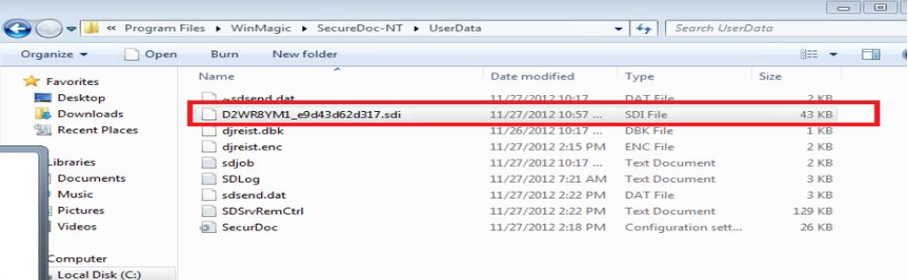
Send/email the .sdi file to the SES Administrator as an email attachment, or copy it to a USB memory stick and send that to the SES Administrator.
NOTE: The next steps are performed on the SES server, or on a device running the SES Console application, such as an SES Administrator's computer.
2. Create a new subfolder in the device's C:\Program Files\WinMagic\SDDB-NT folder and label the new folder: "Machine_Info".
3. Copy the received .sdi file into the SES console, i.e. C:\Program Files\WinMagic\SDDB-NT\Machine_Info folder
4. From the SES Console, click on the MachineInfo files navigation element (shown on the left side of the image below)
5. Right-click in the panel at the right, and using the context-menu that will appear, select the "Import MachineInfo files" option, or press the Insert key, as shown in at the right of the image below.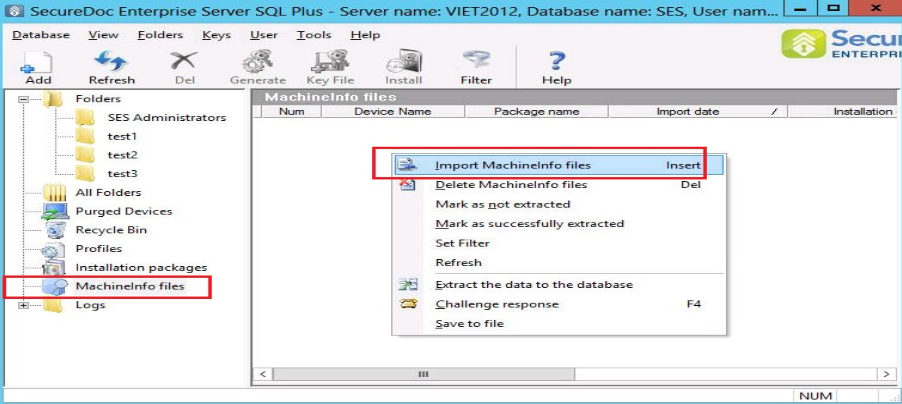
6. In the "Import SecureDoc MachineInfo files" file picker panel that will appear, browse to the location of the received MachineInfo file, e.g. C:\Program Files\WinMagic\SDDB-NT\Machine_Info folder and click to select the file.
6a. Click OK to accept that file.
6b. Click the "Import" button, as shown at the bottom of the image below.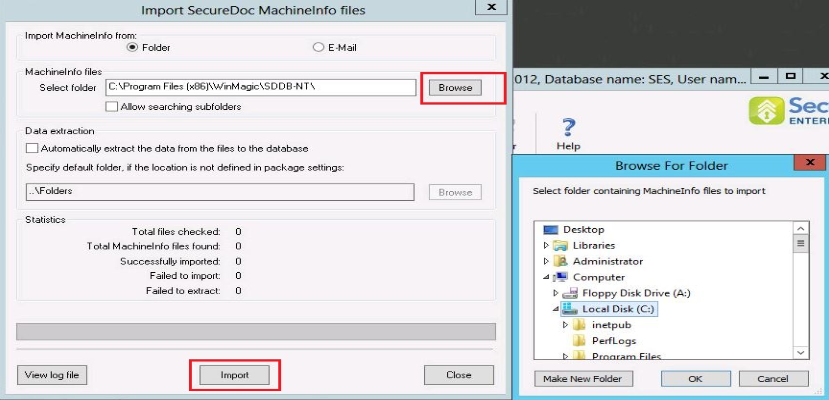
The Device information just imported should now be listed on the SES Console's Devices tab data panel.
Background:
Although infrequently used because of the obvious benefits of having Client devices communicate regularly to the SES server through SDConnex, MachineInfo files have continued to be supported in SecureDoc and SecureDoc Enterprise Server. They are primarily of value to specific customer verticals such as military and paramilitary/police organizations, whose highly rigorous security models may prohibit the network-based communication of software products such as SecureDoc.