Issue:
ActivIdentity Gemalto Cyberflex Smart Card and token do not work at V5 Pre-boot logon prompt in SD 5.3SR2. - Error password is incorrect
Probable Cause:
The user cannot login successfully using the ActivKey token if "Metropolitan Police Purple Smart Card" is enabled by default.
Product version affected:
All SD versions
Environment (OS/hardware/software):
Windows 7 64 bit with PBL installed
Smart card used: ActivIdentity UID C5(Gemalto Cyberflex Access 64K V2c)
Smart card reader: Alcor internal reader
Middleware: ActivClient CAC 6.2.50
Work Around/Solution:
- Please disable the option "Metropolitan Police Purple Smart Card” in the Advanced Options within the profile under Boot Configuration prior to installing Boot Logon
- Permanent fixed version 6.2 - the "Metropolitan Police purple card" is disabled by default,
- The card has been renamed to "Advanced ATR Mode (not recommended for most cards)" under Boot Configuration > Advanced options tab.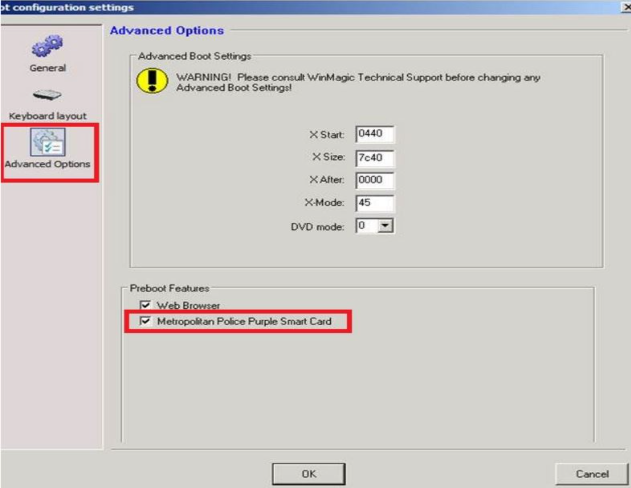
Reference:
SD-1391
SD-2847