Issue:
When inserting RSA SID 800 token at pre-boot login, the following errors may be displayed:
0x00007722 - No smartcard detected in card reader.
- Unsupported token error.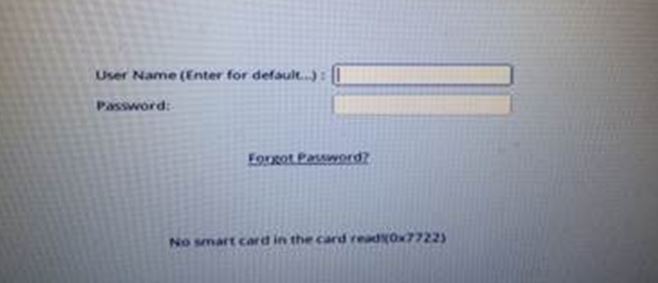
Product version affected:
SD version 5.3 and up to 6.5SRx
RSA Control Center ver. 8.3.x.x
Environment (OS/hardware/software):
Windows 7 Professional 32 and 64 bits
Any devices
RSA SID D3 token
Software and System Requirements:
NOTE: SD does not support PIN protection on SID 800. SD only supports certificate on token.
Token Firmware Update:
- RSA has released a firmware update from v3.00 to v3.01 for the SID800 Rev D1 (Sahara smart card) recently.
Some customers have reported issues related to this change which has resulted in disk encryption products failing to authenticate
at pre-boot when used with the RSA SID800 Rev D1, D2 and D3 smart cards containing the v3.01 firmware.
- The firmware update includes a timeout fix for CCID which addressed a change to CCID support within Windows Vista and Windows 7.
The update is in accordance with the CCID specification which can be found at http://www.usb.org/developers/devclass_docs/DWG_Smart-Card_CCID_Rev110.pdf.
A couple of references related to the timeout are located within the document in sections 3.2.1 TPDU level of exchange and Table 6.2-3 slot
The latest firmware has been made available via a download from the following url: https://sftp.rsa.com/human.aspx&Username=support&password=Password1&arg01=718428373&arg12=downloaddirect&transaction=signon&quiet=true.
Certificate Requirements:
- The certificate must not be expired.
- The certificate should contain appropriate Key Usage attribute. SecureDoc consider a certificate appropriate for encryption if Key Usage value includes Data or Key Encipherment or both.
- Key size should be 1024 - 4096 bits.
- Certificate taken from file should be in DER-encoded format.
- To invoke certificate validation (optional) the certificate has to comply with X.509v3 standard.
- All requirements may be checked visually by opening the certificate (from .cer / .crt file or through certificate store) in Windows and looking into Details tab.
Solution:
1. Determine what version of the RSA SID 800 token, D1, D2 or D3? At the back of the token it should be label the version of the token.
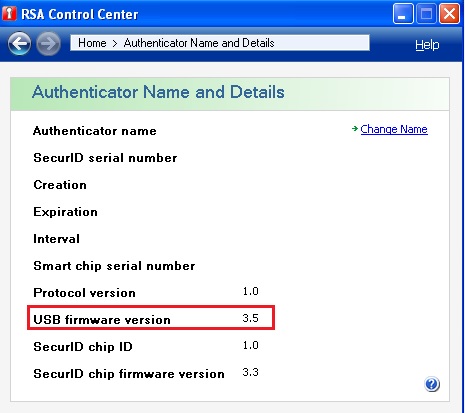
2. Determine what is RSA token’s USB firmware version. It should be 3.5. Please consult the vendor for tis critical file.
3. Determine if the certificate has the file extension .p12 or .pfx