Issue:
Not all users in an Organization Unit (OU) are displayed when attempting to assign users to a given device using the SESWeb browser-based Console.
Applies to:
Version of SES WEB Console: 7.1 and 7.1SR1
Workaround:
Database Administrator or User that has SQL access rights will be required to alter dbo.spWeb_GetUsers stored procedure.
Steps below will outline how this change can be performed.
Prior to applying any changes , please ensure the database has been backed up
1) Open up SQL Management and connect to SecureDoc database
2) Expand the Database name
3) Expand Programmability
4) Expand Stored Procedures
5) Under Stored Procedures look for dbo.spWeb_GetUsers
6) Once dbo.spWeb_GetUsers is located , right click on it and select Modify ( please reference screenshot below)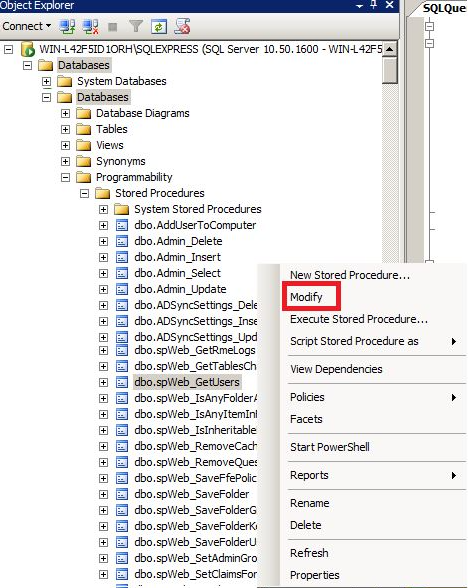 7) Look for line 155 or statement that starts with " IF (@ExcludeTempUsers <> 0). "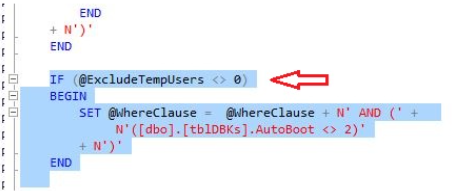
8)Alter the following line from N'([dbo].[tblDBKs].AutoBoot <> 2)' and change it to N'(ISNULL ([dbo].[tblDBKS].AutoBoot,0) <> 2)'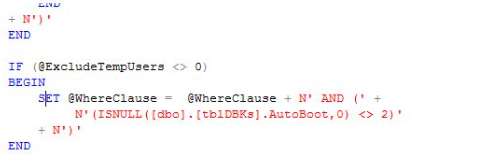
9) To commit these changes ensure correct DatabaseName is selected and then hit Execute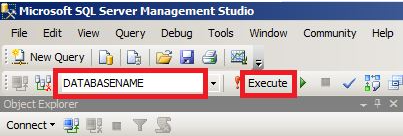 10) Open SES Web console and verify that all users are now visible when specific OU is selected.
Searchwords: Assigning user to device , SES WEB assign user to device , Assign user to SESWEB ,Web Console ,7.1 , 7.1SR1