Issue:
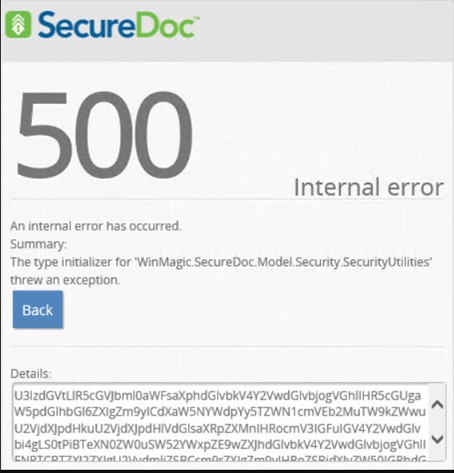
Client may experience the following error 500, “An internal error has occurred when accessing SESWeb.
Summary: The type of initializer for “WinMagic.SecureDoc.Model.Security.SecurityUtilities threw an exception.”
See screenshot below.
Decoding the Details:
System.TypeInitializationException: The type initializer for 'WinMagic.SecureDoc.Model.Security.SecurityUtilities' threw an exception.
---> System.InvalidOperationException: The SQL Server Service Broker for the current database is not enabled, and as a result query notifications are not supported.
Please enable the Service Broker for this database if you wish to use notifications.
at SqlDependencyProcessDispatcher.SqlConnectionContainer..ctor(SqlConnectionContainerHashHelper hashHelper, String appDomainKey, Boolean useDefaults)
at SqlDependencyProcessDispatcher.Start(String connectionString, String& server, DbConnectionPoolIdentity& identity, String& user, String& database, String& queueService, String appDomainKey, SqlDependencyPerAppDomainDispatcher dispatcher, Boolean& errorOccurred, Boolean& appDomainStart, Boolean useDefaults)
at SqlDependencyProcessDispatcher.Start(String connectionString, String queue, String appDomainKey, SqlDependencyPerAppDomainDispatcher dispatcher)
at SqlDependencyProcessDispatcher.Start(String connectionString, String queue, String appDomainKey, SqlDependencyPerAppDomainDispatcher dispatcher)
at System.Data.SqlClient.SqlDependency.Start(String connectionString, String queue, Boolean useDefaults)
at WinMagic.SecureDoc.Model.Security.SecurityUtilities..cctor()
…….
…….
Probable Causes:
This can be one of two reported issues:
1. Customer may run into this situation during server OS migration
2. Due to environment circumstances, the client's application servers and database had to be restored.
Upon restoration, customer may encounter this error when trying to login back into SESWeb.
SES version:
Any SES version
Environment (OS/hardware/software):
Any Windows OS Servers and SQL
Troubleshooting:
1. Submit a ticket with [email protected] detailing how this error message came about.
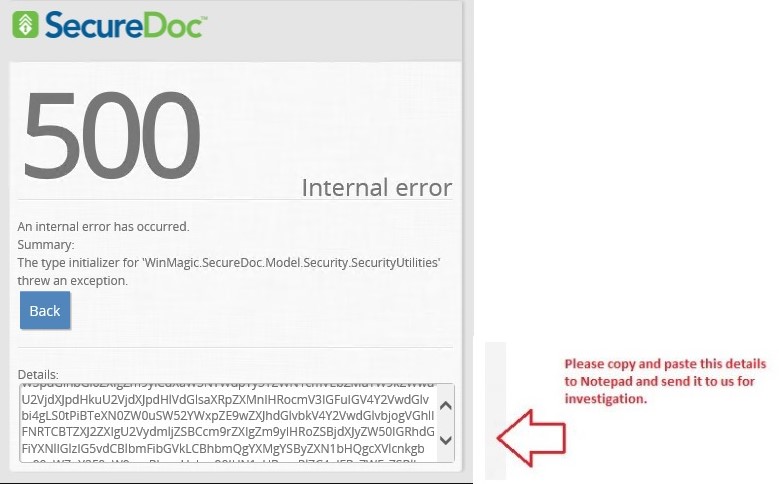
2. Capture a screenshot of the 500 error message like the one below.
3. Select All --> copy and paste the details from error 500 GUI to notepad and send to [email protected] for investigation.
4. Enable the SESWeb logs from SDWeb Configurator. Stop and start the SDConnex and restart the Internet Information Server.
Once the error has been reproduced, stop the SDConnex, extract the called SESWebAppTrace.svclog from C:\program files (x86)\Winmagic\SDDB-NT\Logs and send it to [email protected].
Then restart the SDConnex service.
Support will verify whether this error is due to the SQL Server Service Broker for the current database is enable or not.
Solution/Workaround:
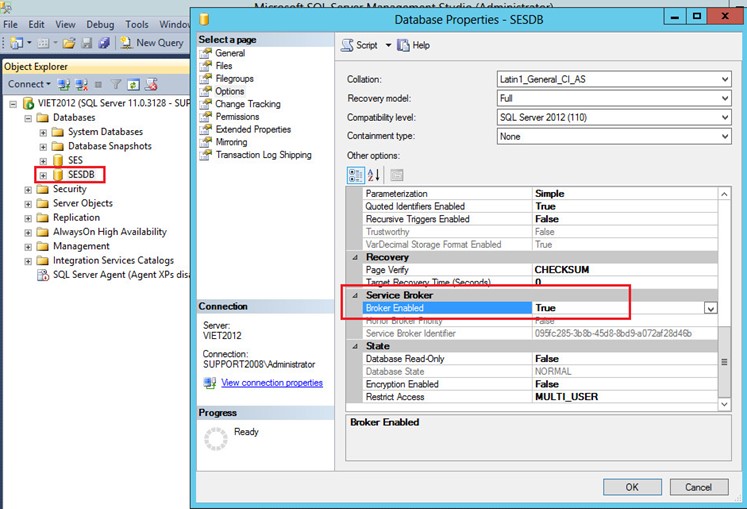
1. To enable the SQL Database’s service broker, verify under Database Properties for the Service Broker whether it is enabled or not.
See screenshot below.
2. After enabling the service broker, restarted SDconnex and IIS in respective order.
3. Launch SESWeb and verify that you can log in or not.
Alternative troubleshooting by running the following queries:
1. Check to see whether Service Broker is enabled: select name,is_broker_enabled from sys.databases where name= [YourDB]
2. If Service Broker isn't enabled, generate a new Service Broker: ALTER DATABASE [YourDB] SET NEW_BROKER; GO.
3. Enable Service Broker on an existing database
Reference SF: 128616.