Issue:
Client may experience the Error 500 when accessing the SES Web
Probable Causes:
This can be one of two issues:
a. Clients may have duplicated Groups\Folders
b. It can be caused by bad cached credentials
Product version affected:
SD 6.1 and up
Environment (OS/hardware/software):
Please refer to the latest system requirements from
http://www.winmagic.com/support/technical-specifications
Solution/Workaround:
Step1:
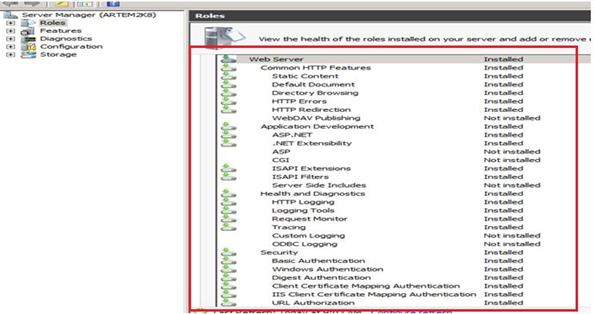
Please ensure that the IIS Configuration settings are properly configured.
Please reference KB 1483 - How to setup SES Web article.
Step 2:
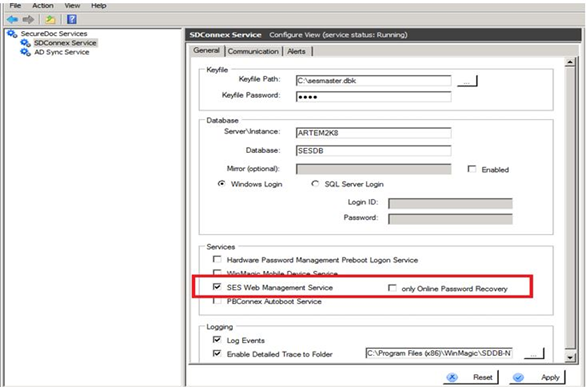
Verify that the SDconnex Communicating Server is registered and running with the following setting enabled, "SES Web Management Service".
Step 3:
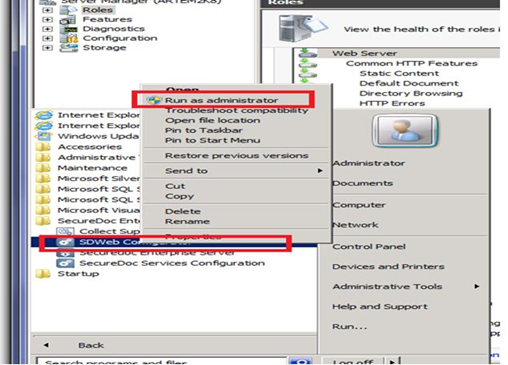
If the database is on different machine (registered), please refer to "KB 1482 How to create new certificate for 6.x SES Web" article to ensure that you have properly set up the Self Signing Certificate. Once the cert is registered run the SDWeb config with admin rights.
Step 4:
If customer is still receiving the error 500, please send support the Text output from the website.
This can be one of two issues:
1) The client may have duplicated Groups\Folders
Open the SQL Management Studio and run the following query:
select * from
(select Count(GroupName) as Instances, GroupName, Folder from Groups
Group By GroupName, Folder) a
where a.Instances > 1
select * from
(select Count(Folder_Name) as Instances, Folder_Name, Folder_Folder from tblFolders
Group By Folder_Name, Folder_Folder)
where a.Instances > 1
2) It could be caused by bad cached credentials
a)Please stop SDConnex service
b)Please ask your DBA to back up the database and perform the following changes
c) Launch SQL Management Studio
d) Open a query window to the SES database.
e) Execute the statement: ALTER DATABASE <database> SET NEW_BROKER WITH ROLLBACK IMMEDIATE;
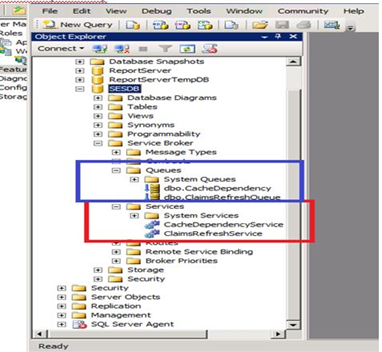
f) In SQL Management Studio, expand the database -> Service Broker -> Services node
g) Delete CacheDependencyService and ClaimsRefreshService (right click on the node and select delete in the popup menu)
h) Navigate to database -> Service Broker -> Queues
i) Delete Services CachedDepenancy and Claims refresh then, deled Queues> ClaimsRefreshQueue and CacheDependency
j) Done
Please restart SDConnex