How to Article:
The purpose of the .WinMagicRecoveryUser is to bypass FV2 pre-boot when Mac user has forgotten his/her password.
This recovery account enables the user to reset his/her password on his/her account.
Steps to Follow:
1. To enable the WinMagic Recovery Account:
Right click on the profile for FV2 > Modify Profile
Select General Options > Advanced Options > check mark the option "Enable WinMagic Recovery Account, to recover access to FileVault2-Protected device".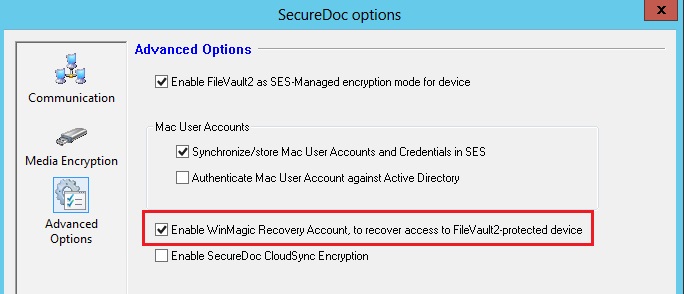
2. Right click on the device > select "Assign Device Profile to Devices" > Select the profile and click OK.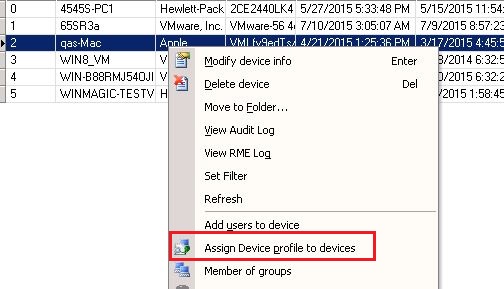
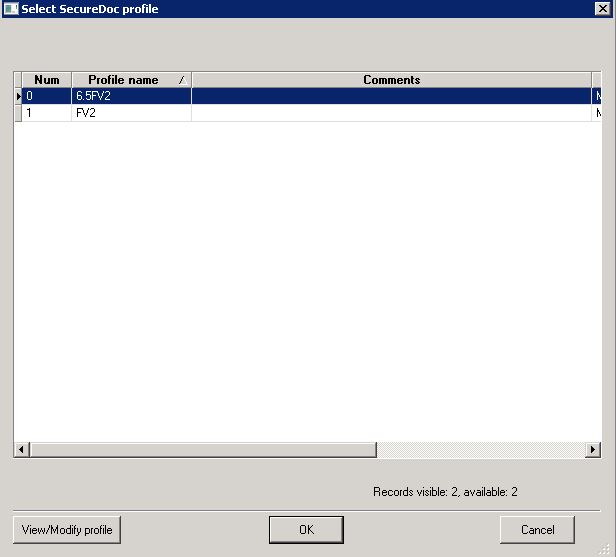
3. From client device, select "Communicate with the server" > Restart the device
4. This recovery account will be shown as .WinMagicRecoveryUser account under the device.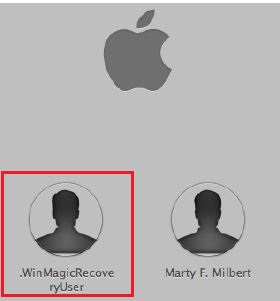
5. The Recovery account password can be found when the admin right click on the device and select "Modify device info" > click on "View FileVault Properties".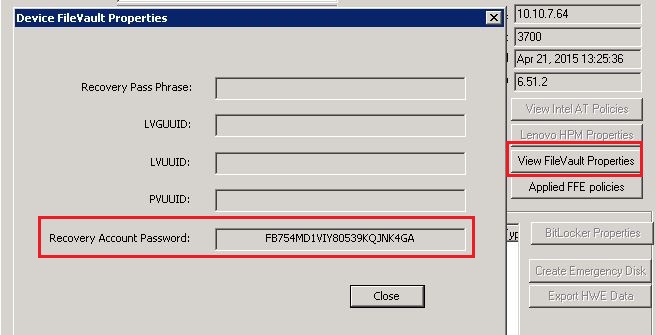
NOTE:
Once the end user has logged successfully onto the device and communicated back to the server, the .WinMagicRecoveryUser's password will change and update the SES console.