Performing Yosemite install via Boot in Recovery Partition
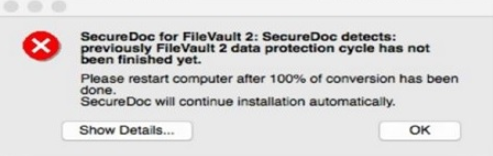
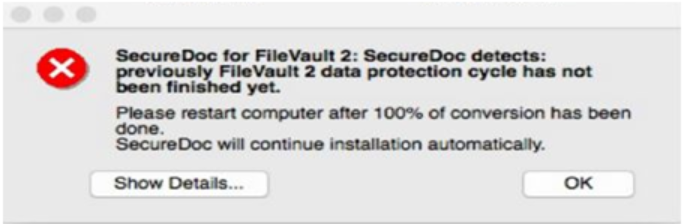
Client may encounter the following error when installing SDFVMacYosemite.pkg from SD 6.5 on a Mac OS 10.10.x Yosemite: "SecureDoc for FileVault 2: SecureDoc detects: previously FileVault 2 data protection cycle has not been finished yet. Please restart computer after 100% of conversion has been done. SecureDoc will continue installation automatically."
Before a client runs the Mac OS X Yosemite installation via Boot into Recovery partition, please ensure the following condition is met before installing the SDFVMacYosemite.pkg from SD 6.5.
- Check to make sure that Core Storage partition (logical) is not enabled
When doing a Fresh install of OS X Yosemite on a Macbook device (Air or Pro), the disk utility may show a logical volume where the volume for Macintosh HD should be.
Open Terminal, and run diskutil list
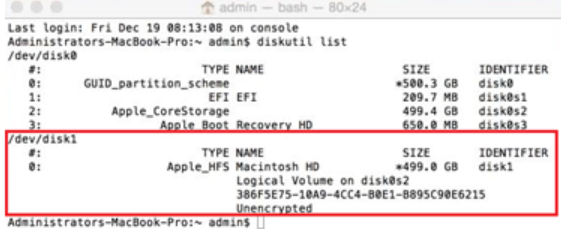
Yosemite now uses Core Store to manage the root partition as a logical volume (arstechnica.com/apple/2014/10/os-x-10-10/2) – According to the article; Core Storage is prerequisite for File Vault and is applied by default during installation.
You can convert Yosemite’s Core Storage partition back to HFS+. Some notes with this procedures:
- This is not destructive. You won’t lose anything.
- This only works if you have not encrypted the partition with File Vault.
Here’s how:
Open Terminal, and run the command diskutil cs list
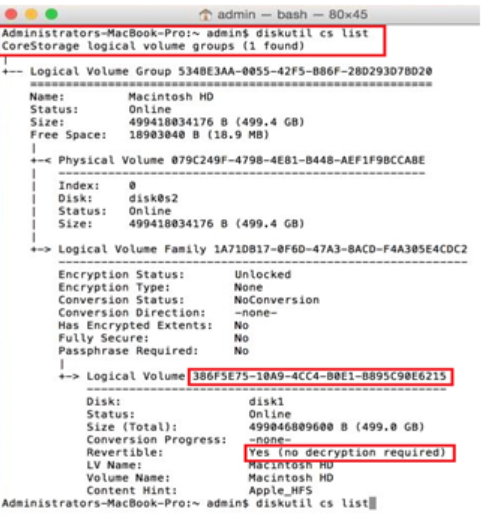
If you see “Revertible: Yes (No decryption required)”, it means we can convert it back. You’ll need that super-long string of letters/numbers (lvUUID) i.e. 386F5E75-10A9-4CC4-B0E1-B895C90E6215.
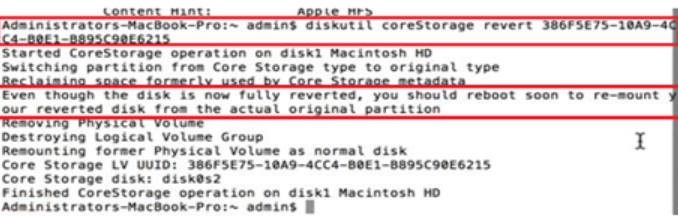
In the same Terminal window:
type: diskutil coreStorage revert 386F5E75-10A9-4CC4-B0E1-B895C90E6215
Once that is finished, please reboot the device in order to re-mount the reverted disk from the actual original partition.
Once the device has rebooted, please run the command again: diskutil list.
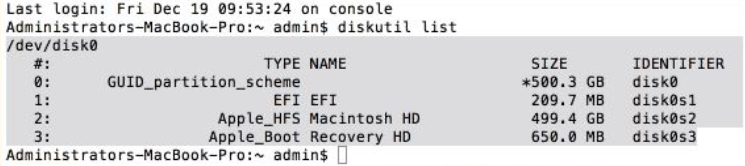
Some final notes:
- For more details, check out this forum thread on MacRumors. In particular, post #38.
- The first terminal command, diskutil cs list will only work if you actually have a CoreStorage partition.
- You must reboot the device in order for the reboot the device in order to re-mount the reverted disk from the actual original partition.
- Core Store does not occur if client run Yosemite installation via Boot into Primary partition
If the above steps are not taken you may encounter the error below when running the SDFVMacYosemite.pkg from the SD 6.5.
Order of commands:
- Open Terminal, and run the command diskutil list
- Open Terminal, and run the command diskutil cs list
- type: diskutil coreStorage revert 386F5E75-10A9-4CC4-B0E1-B895C90E6215
- Reboot device
- Open Terminal, and run the command diskutil list
- Run SDFVMacYosemite.pkg