Extending Encrypted Logical Volumes
The process below shows how to extend the encrypted lvm root partition to a new attached disk
- Attach the new disk to the existing encrypted system
- Partition the disk with your preferred partitioning tool (e.g., fdisk, parted, or gparted).
NOTE: You can skip to step 3 if you are just using the entire disk as PV.
Example:
parted /dev/sdb
mklabel --> set to gpt
mkpart --> create primary partition
exit parted tool
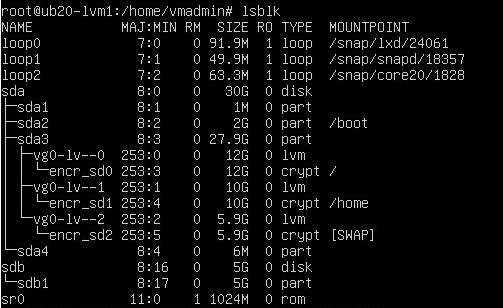
Create physical volume (PV) on the newly created partition with pvcreate command.
Example:
pvcreate /dev/sdb1
- Extend the volume group (VG). Use command "vgextend <vg_name> /dev/sdX1"
Example:
vgextend vg0 /dev/sdb1
- Extend the logical volume. Use command "lvextend -L +<size> <lv_path>"
Example:
lvextend -L +2G /dev/vg0/lv-0
or
lvextend -l +100%FREE /dev/vg0/lv-0
- When you run lsblk command, you will notice the lvm size increase but the encrypted partition size remains the same
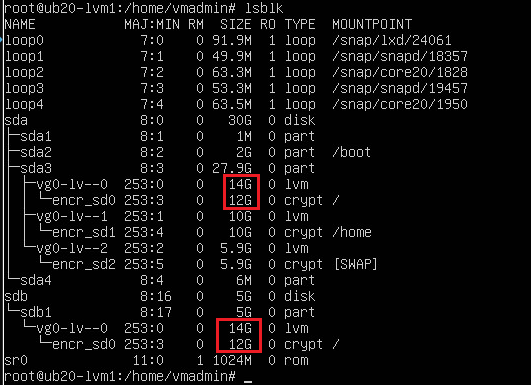
- Reboot client machine
- After reboot, run the lsblk command again and you should notice the encrypted partition size should now be increased as well
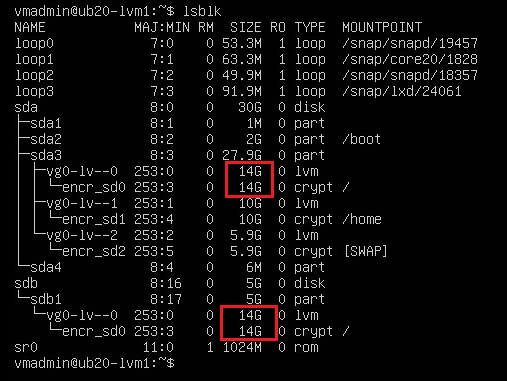
- Resize the file system so it uses the additional space
Example:
Resize2fs /dev/mapper/encr_0
- You can confirm that the filesystem has been extended as well by running the df command (/dev/mapper/encr_0 should show the correct size now)