V8.6SR1 solves the issue where Customers encounter name resolution issues if their Domain NETBIOS differs from their AD Domain name prefix.
Prior to V8.6SR1, customers whose NetBIOS name differed from their Domain prefix had been advised to remain on V8.5SR2 to await a solution. (This issue does not affect customers whose Domain prefix is the same as NetBIOS name).
Example of this issue:
For most customers, the NETBIOS name will typically be the same as the domain prefix (e.g., if Domain name=Domain1.name.local, then NetBIOS name=Domain1).
However, some customers may utilize a different NETBIOS name (e.g., name=Domain1.name.local, but NetBIOS name=americas) which can cause difficulties in user import through ADSync if not handled through the addition of an ADSync setting defined below
In 8.6 SR1, WinMagic has added a new ADSync parameter to address this issue.
Through the use of the following ADSync parameter, ADSync can look to the NetBIOS name instead of using the prefix of the Domain.
- Name: adsync.service.domain.netbios.name
- Type: Integer
- Default: 0
Description: If set to 1, this option indicates that the NetBIOS name differs from the domain name prefix, and so will be used when ADSync imports User information from AD.
NOTE: During ADSync configuration, administrators may see a reminder phrased something like this:
REMINDER: Format is NetBIOS\user. NetBIOS name is usually the same as the domain name prefix. (e.g., if Domain name=Domain1.name.local, then NetBIOS name=Domain1).
If NetBIOS name is different: Use ADSync Configuration tool. a) Right-click on domain; b) Open Parameter Settings; c) Set the "adsync.service.domain.netbios.name" parameter to 1.
How to apply new ADSync parameter to use NetBIOS name
Step1: Open SecureDoc Services Configuration and go to ADSync > Sync Config tab. Right-click on the <domain> - [Directory Server] and select Parameters Settings.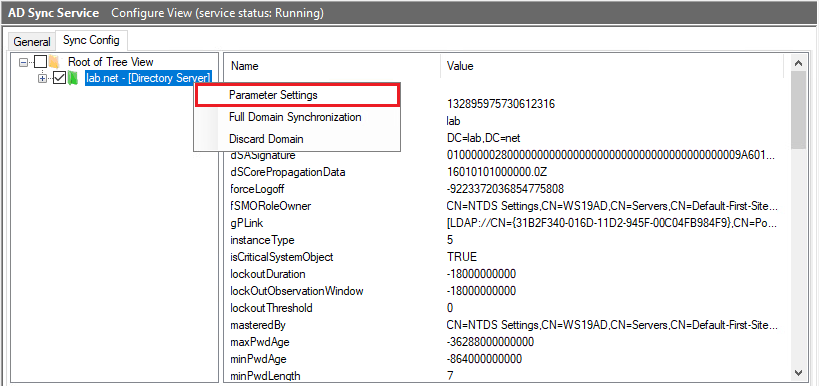
Step2: Scroll to bottom of the list of Default Settings and copy the parameter "adsync.service.domain.netbios.name" with a value of 1 to the Domain Setting below. Hit Save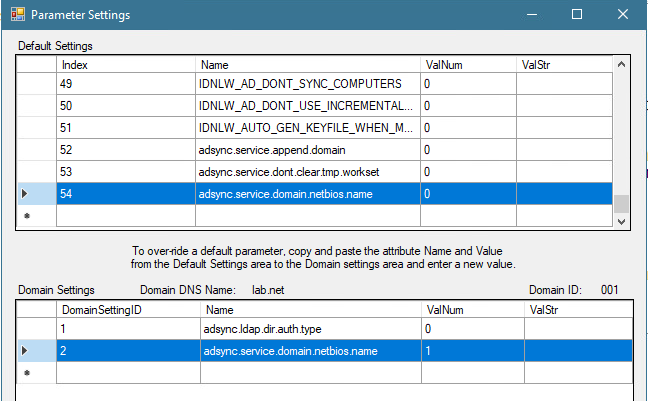
Step3: Restart the ADSync Service and check the ADSync Eventlog for the event "Domain Controller NetBIOS name: <NetBIOS Name>"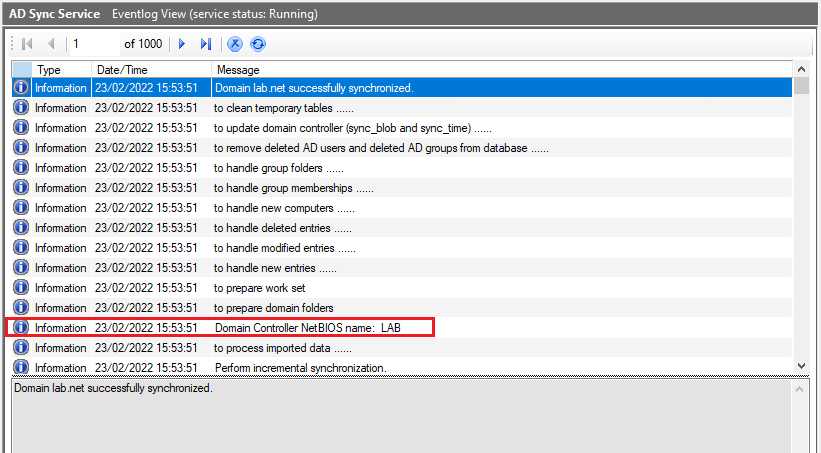
SecureDoc deployment relating to this issue is described on KB1884