SecureDoc-8-6-SR1-client-primary-account-setup-User-cannot-be-found
For customers using different domain and NetBIOS names and deploying SecureDoc 8.6 SR1 client, they might have device failing to confirm the primary owner with a “User cannot be found” error and not moving from Temp Autoboot to a Deployed state.
Temp Autoboot: means the deployment is not complete as the primary user account is not finalized. While in this state the SecureDoc Preboot authentication will not display, which leaves the device vulnerable.
During this failed install, the 0x780f error would be logged in the SDPin.log file
Analyzing the SDPin.log file
======================================================================================
[11968:12888] DBG SDD Deployment::ConfigureKeyFileForSM: ---------- Reaching secure moment ----------
[11968:12888] DBG SDD Deployment::ConfigureKeyFileForSM: Need to move primary keyfile to dbk0
[11968:12888] DBG SDPin MoveUserKeyfileToDBK: MoveUserKeyfileToDBK(006324, 0)
[11968:12888] ERR SDPin MoveUserKeyfileToDBK: GetDBKIndexFromUserID() status: 0x780F
[11968:12888] CRIT SDD Deployment::ConfigureKeyFileForSM: MoveUserKeyfileToDBK, status: 0x780F
[11968:12888] ERR SDPin BackgroundAutoSMCompleteThread::run: Deployment::ConfigureKeyFileForSM() FAILED with 0x780F
[11968:12888] ERR SDPin ShouldWaitForSES: Not a connectivity error, do not retry connection to SES
[11968:12888] CRIT SDPin BackgroundAutoSMCompleteThread::run: [Secure Moment] Non-connectivity error detected, aborting automatic SM
To accommodate this arrangement, ADSync parameter “adsync.service.domain.netbios.name" has been added in 8.6SR1 to apply to the domain setting. To do this follow these steps:
1. Open SecureDoc Services Configuration and go to ADSync > Sync Config tab. Right-click on the <domain> - [Directory Server] and select Parameters Settings.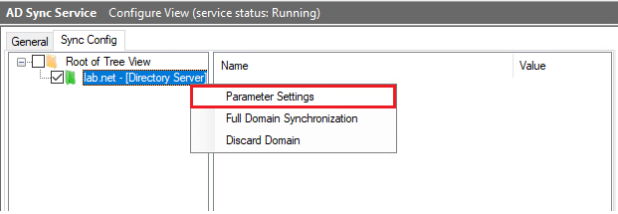
2. Scroll to bottom of the list of Default Settings and copy the parameter "adsync.service.domain.netbios.name" with a value of 1 to the Domain Setting below. Hit Save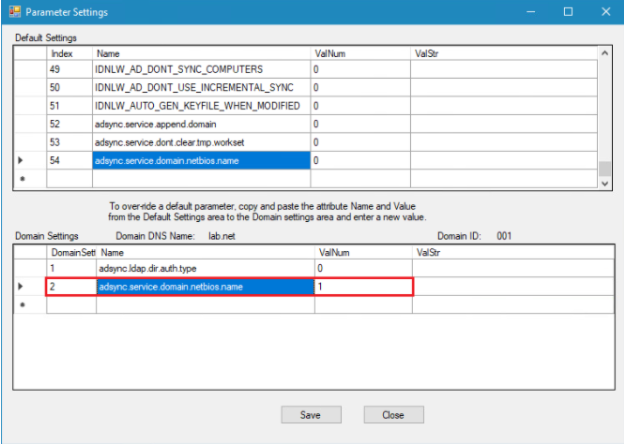
3. Restart the ADSync Service and check the ADSync Eventlog for the event "Domain Controller NetBIOS name: <NetBIOS Name>"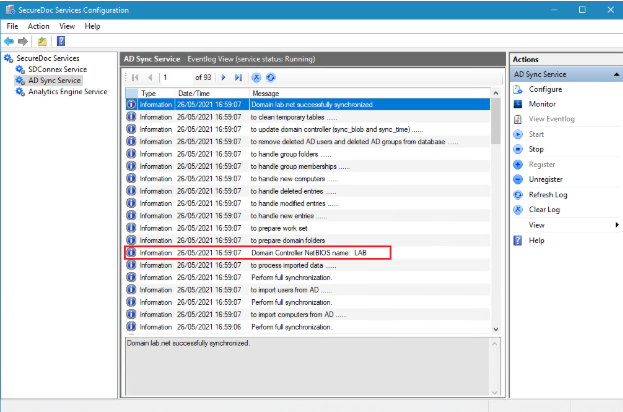
Jira SD-38000