Title: How to define a static IP address for endpoint devices to use to connect to SDConnex (e.g. after VPN has been established)
The External static IP can be set at pre-boot by applying the "Knownconfigs.xml" while installing the SD package on the client
or
add the param StaticIpUseCustomConfig=1 by manually editing the profile (using the "Edit manually" option in the Profile configuration panels). Then, the profile can be assigned to the client device after the client has installed SecureDoc.
Case 1: Apply functionality to store a fixed IP address through settings in "KnownConfigs.xml" - this takes place while installing SecureDoc.
Steps:
1. Replace the "KnownConfigs.xml" file and install the SecureDoc package on the client
2. After having installed SecureDoc successfully,
Go to C:\\Program Files\WinMagic\SecureDoc=NT\UserData

Make sure the File name extensions enabled. Click on view and check “File name extensions”.

Create the "Ipconfig.ini" file in the "Userdata" folder on the endpoint device, as per the following:
[External IP]
MACAddress=
IP=
Subnet=
Gateway=
NameServer1=
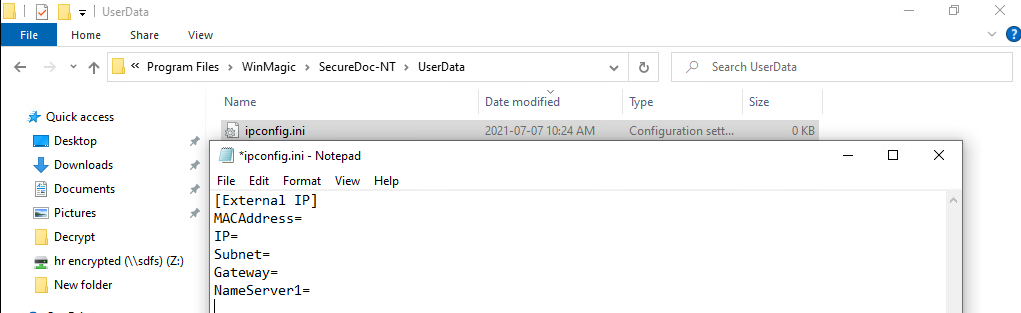
Note: If the IpConfig.ini file with NO MacAddress is set, It will choose the first EtherNet Interface to apply the Static IP (in case multiple Enthernet Interfaces exist)
3. Open a "cmd" terminal.
4. Change directory to SecureDoc-NT
--> Run cmd: SDPin.exe /SetStaticIP
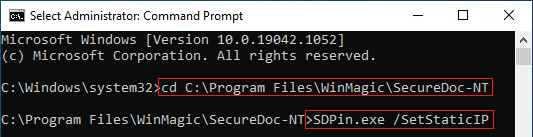
5. A balloon message will appear, whose text is: "The Static IP configuration was successfully set."
6. Re-boot the machine. On this and subsequent reboots, the Boot Logon information will use the static that was set at Step 1, above.
Case 2: Apply through use changes to the profile using the Profile's "Edit Manually" option, then assign the profile from SES server.
- Using the SES Console's "Edit Manually" functionality,
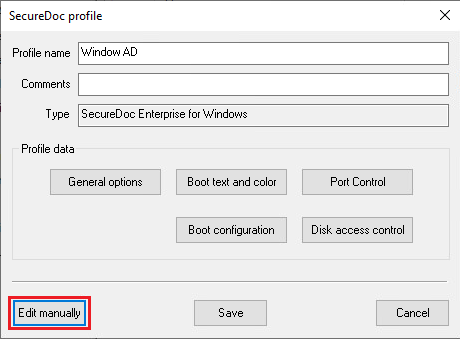
Add the param "StaticIpUseCustomConfig=1" within the "Package Settings" section.
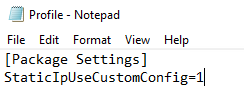
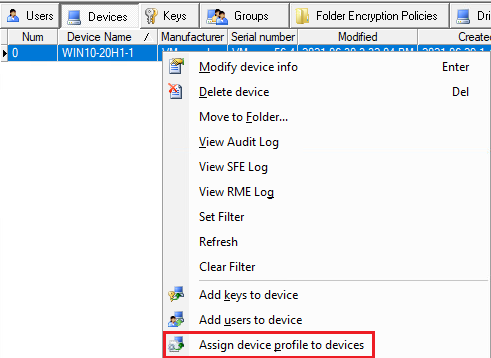
2. Assign the profile to the desired SecureDoc Client devices
3. Run steps 1 through 4 from Case 1, above.
4. Change the parameter "StaticIpUseCustomConfig=0" and assign to the SecureDoc clients to disable External IP