Issue:
The user couldn't authenticate against Windows AD. In this circumstance, error number 0x7036 is displayed. The full text of this error is: “PBConnex failed to authenticate the user against Windows AD (0x7036)”, as shown in the image below.
This occurs when a newly-created user is being validated against the Domain at pre-boot.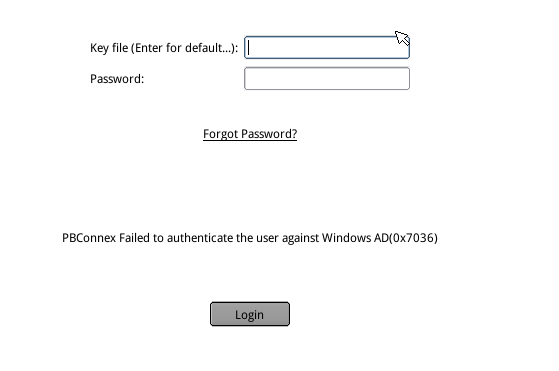
Probable Causes:
Microsoft has released Security updates KB3167679, MS16-101, KB3177108.
These security updates correct some of the authentication vulnerabilities that existed within Windows
WinMagic has tested Windows Server without these patches and found that without them, this issue does not occur.
Once Windows servers have had these patches applied, this issue began to occur for new Windows AD accounts at pre-boot.
More information on what is contained in these patches can be found here
https://technet.microsoft.com/library/security/MS16-101?f=255&MSPPError=-2147217396
Product version affected:
Currently this can affect any version of Securedoc (6.4 to 7.1xx) that utilize Windows AD validation at pre-boot
Environment (OS/hardware/software):
Windows Server 2008/2012/2016
Work Around:
For clients that utilise Windows AD validation at pre-boot, WinMagic asks those customers not to install the above-specified patches on servers Running SDConnex. Other servers can safely be patched
For clients that have installed the above-specified KBs (patches) we ask them to uninstall those patches from those SDConnex servers that are handling Pre-boot AD-based authentication.
If rollback is not possible, a less Secure workaround is to remove the option “User must change password at next logon” from the AD domain controller rules (a less likely option)
As a final alternative, the intended user(s) can be assigned manually to the target device which will place a local key file on the device for that use. This should be protected with the user’s present password (as stored within SES).
This can be found in KB000001177, or in the link listed below.
https://winmagic.force.com/Service/articles/Service/How-to-add-new-user-to-computer-ensuring-he-she-sets-a-personal-password-on-first-use-of-computer?popup=false&navBack=H4sIAAAAAAAAAIuuVipWslLyzssvz0lNSU_1yM9NVdJRygaKFSSmp4ZkluSA-KVAvn5walFZZnKqfnxppn42TIM-kIOi2744NbEoOcPWAAQMDc3NlWpjAeWGa45mAAAA
Fix Version:
resolved in Version 7.1 SR4
Limitation:
N/A
References:
SD-19799
Searchwords: 0x7036 , KB3167679 ,MS16-101,KB3177108