Issue:
For those customers who had upgraded the SES from previous versions (6.5 or earlier) to 7.1 or newer, new installation packages generated under the new SES version will prompt the end user to enter a password following a reboot into the device (see screenshot below).
This new provisioning message is new to SD 7.1 and its purpose is to provide a new set of methods to protect devices through SecureDoc Encryption as early as possible in the device implementation process. It is intended to help with the SD Key File deployment and address some of the complexities and challenges that were associated with previous SecureDoc versions and keyfile deployment.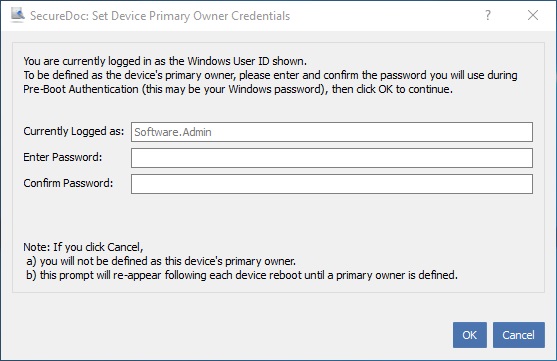
The purpose of this prompt is to get the device to the point of ownership (or in more broad terms, to define at what point the device can be considered in its final point of use, such as out of the hands of an IT Technician preparing it, and into the hands of the intended user), so that any temporary means of accessing the device while it is being prepared or staged can be eliminated.
If this prompt appears while the device is still being prepared, the IT Technician would simply cancel out of this prompt, and as can be seen at the bottom of the panel above, it will continue to appear until the “owner” of the device (or one of the “owners” of the device, if share) confirms ownership by entering and confirming his/her password.
Please refer to the SES User Manual and release notes (see below) for further detail information regarding this new feature.
Background:
SecureDoc Key File deployment has been re-designed to make SecureDoc Full Disk Encryption process less disruptive, yet seamless and more robust by eliminating certain complexities and challenges that were associated with the key file deployment in the previous versions of SecureDoc. The provisioning Panel in the Installation Package makes the device deployment and securitization process clearer and easier to understand. Provisioning provides more clarity on how client devices become assigned to users.
Sources of complexity, such as:
• Expiry of initial passwords that could lock out a device
• Unknown password changes or users forgetting their passwords, these complex issues have been either eliminated or substantially mitigated
• Temporary passwords defined in the SES Global Settings and the Installation Package definition have been eliminated
Product version affected:
SES 7.1 and newer
Environment (OS/hardware/software):
All devices and Windows OS
Reference:
For further information, please download the SES 7.1 User Manual:
http://downloads.winmagic.info/manuals/SES_v71_User_Manual.pdf
Page 150 to 169 – Setting up Device Provisioning Rules
Page 82 - Creating Installation Packages for Windows
http://www.winmagic.com/support/release-notes:
- Please refer to “Important Note” in SecureDoc V7.1
- SD-11521 SecureDoc Key File deployment has been re-designed