Issue:
SESWeb Error message: “Operation Aborted: Cannot assign user to device with empty user password and empty Generic Password”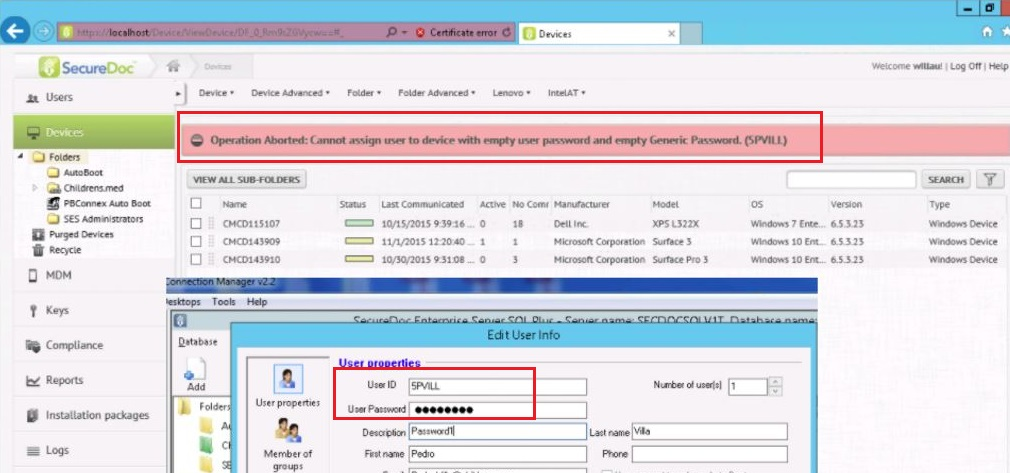
Symptom:
The SES administrator is not able to assign AD user to device using SESWeb.
In SESWeb, the user property does not have the user’s password populated whereas in the SES Console it does have.
If the SES administrator creates a non AD user with Password, the issue is not observed
Probable Causes:
A bug with 6.5SR3 HF2 whereby the AD user has password populated in user property but SESWeb is unable to parse it.
Product version affected:
SES 6.5 SR3 HF2
Environment:
Windows OS and devices
SES Web configured
Active Directory users that have Password
Tools>Options>Key File >Generic Password is not enabled
Informational Gathering and Troubleshooting:
Requesting for the following log:
a. SESWebAppTrace.svclog
b. SDConnexApptrace.svclog
1.Confirm that the user account does have a password in SES Console
2. Check SESWeb user properties if it has a password or not
3. Check the Database to see if the password is listed there for the user or not
4. Check if Generic password is enabled or not.
Resolution:
Enabled Generic Password in Tools > Options > Key File
SES 7.1 will resolve this issue as it removes this rule to no longer check for Generic Password when the process of Assigning user to devices.
Internal Reference:
SD-16117, SF- 67831
1588 Can't Assign User to a device from SESWeb
- Updated on Feb 6, 2026
- 1 minute(s) read
- VN
Was this article helpful?