Issue:
Error: "Unable to find certificate in the cert store, Please make sure SDConnex is configured properly"
Symptoms:
Client experience this error when trying to configure the SES' Web Configuration.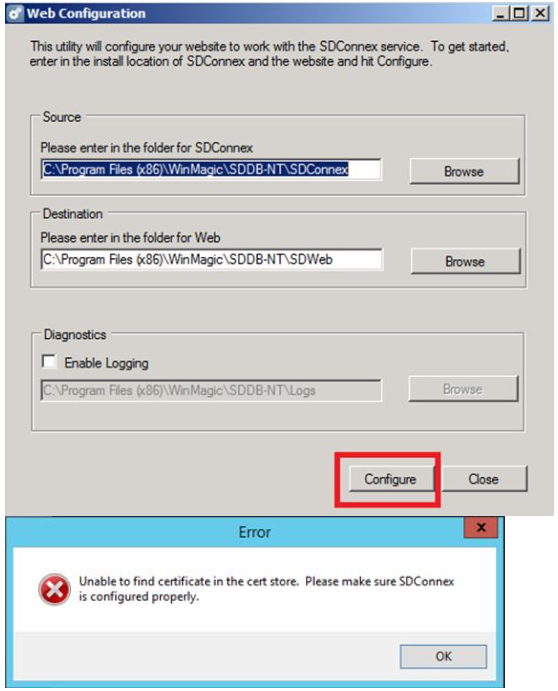
Product version affected:
SD 6.1 and up
Environment (OS/hardware/software):
Please refer to the latest system requirements from
http://www.winmagic.com/support/technical-specifications
Solution/Workaround:
Step 1:
Ensure the account that requires to login to services must have full SQL rights access and to run the services.
Under Services.msc > look for WinMagic.SecureDoc. Services > Right click on the WinMagic.SecureDoc.Service > select Properties
Select the Log On tab > verify the service account to have full SQL rights access to run the service.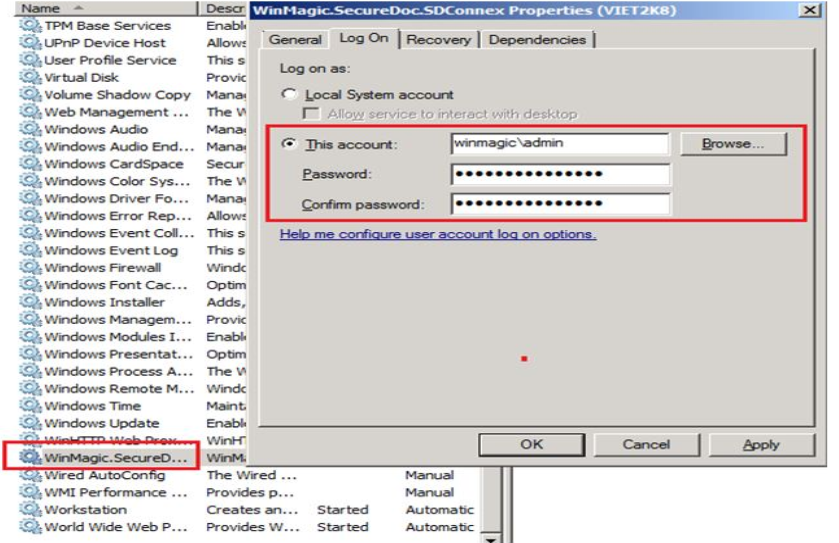
1484 Error: (Unable to find certificate in the cert store, Please make sure SDConnex is configured properly)
- Updated on Feb 11, 2026
- 1 minute(s) read
- VN
Was this article helpful?