Title: HP Printer not printing properly after SD installed on machine
The following HP printers have been reported so far to WinMagic:
HP Officejet 100 and HP Colour Laserjet 4600
Any printer with USB Mass Storage capabilities.
Reference: CAS-14595-B5Q7S4
Causes/Symptoms:
After SecureDoc is installed on a machine, if the HP printer is powered off when a print job is submitted and then printer is powered on, the printouts are not complete. For example: If 5 pages are submitted to the printer, only a portion of the pages are printed.
If SecureDoc is removed from the machine, then print jobs come out properly.
If printer is powered on when printer job is submitted, print jobs come out properly.
This issue occurs not only when the printer is turned off but also when the printer is in hibernation mode.
Solutions:
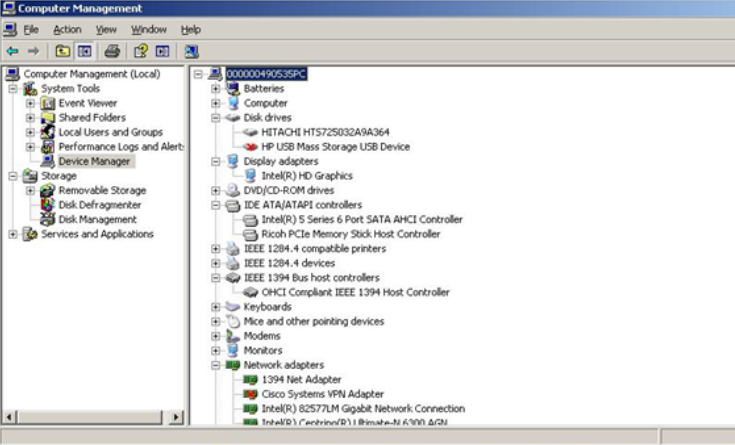
This issue is due to the HP USB Mass Storage device within the printer. When the printer is powered on, SD is trying to probe the storage for information. However, this is not standard storage so SD is taking longer to try to retrieve the correct information; when this happens, the print job gets corrupted. This also explains why the print job is printed properly if the printer was powered on before the print job is submitted.
To implement the fix within the SecureDoc client, it will take some time as it requires programming changes; mostly likely it will be future releases.
A workaround that we found to work in our test environment with the printer sent in is to do the following:
1) Open up Computer Management
2) Go into Device manager
3) Expand Disk Drives
4) Right Click on “HP USB Mass Storage USB Device
5) Select Disable.