Description: When attempting to load the SDWeb site, the error “Server Error in ‘/’ Application” is displayed. Cause: This is caused by the default app pool being switched form .Net Framework 4.0 to 2.0.
This can happen during Windows Updates
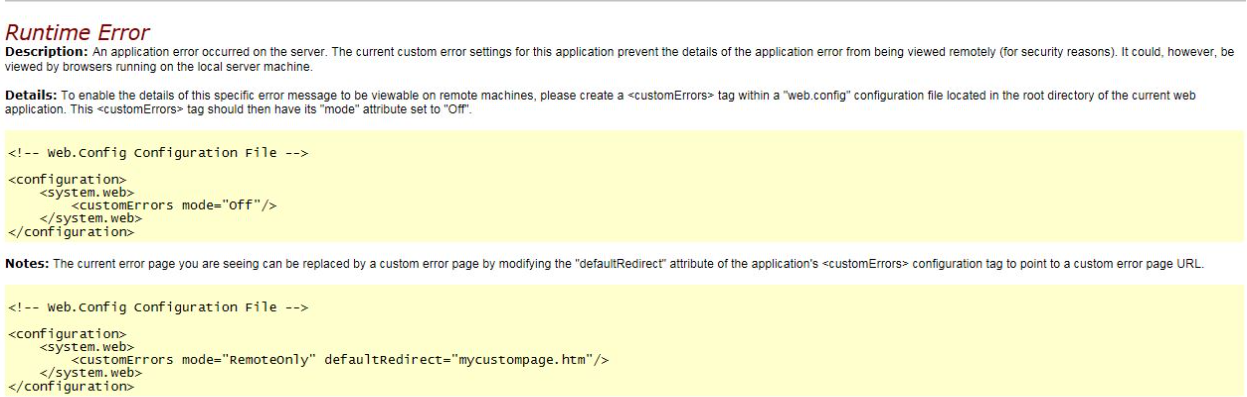 Confirmation When the error above is produce, check the Application Event log on the server hosting SDWeb.
There should be a Warning reported by Source “ASP.Net 2.0.*” with Event ID 1310 for Task Category
“Web Event”. The error should contain the following: Event code: 3008 Event message: A configuration error has occurred. Event time: 30.04.2015 11:13:39 Event time (UTC): 30.04.2015 09:13:39 Event ID: edf10cf390ec4b828ff11373997aaed8 Event sequence: 1 Event occurrence: 1 Event detail code: 0
Application information: Application domain: /LM/W3SVC/2/ROOT-1-130748588193698875 Trust level: Full Application Virtual Path: / Application Path: C:\Program Files (x86)\WinMagic\SDDB-NT\SDWeb\ Machine name: sesserver
Process information: Process ID: 976 Process name: w3wp.exe Account name: NT AUTHORITY\NETWORK SERVICE Exception information: Exception type: ConfigurationErrorsException Exception message: Unrecognized attribute 'targetFramework'.
Note that attribute names are case-sensitive.
(C:\Program Files (x86)\WinMagic\SDDB-NT\SDWeb\web.config line 51) Request information: Request URL: https://sesserver:443/ Request path: / User host address: 10.10.2.26 User: Is authenticated: False Authentication Type: Thread account name: NT AUTHORITY\NETWORK SERVICE Thread information: Thread ID: 6 Thread account name: NT AUTHORITY\NETWORK SERVICE Is impersonating: False Stack trace: at System.Web.HttpRuntime.HostingInit(HostingEnvironmentFlags hostingFlags) Custom event details: Event code: 3008 Event message: A configuration error has occurred. Event time: 30.04.2015 11:13:39 Event time (UTC): 30.04.2015 09:13:39 Event ID: edf10cf390ec4b828ff11373997aaed8 Event sequence: 1 Event occurrence: 1 Event detail code: 0
Application information:
Application domain: /LM/W3SVC/2/ROOT-1-130748588193698875 Trust level: Full Application Virtual Path: / Application Path: C:\Program Files (x86)\WinMagic\SDDB-NT\SDWeb\ Machine name: sesserver
Process information:
Process ID: 976 Process name: w3wp.exe Account name: NT AUTHORITY\NETWORK SERVICE
Exception information:
Exception type: ConfigurationErrorsException Exception message: Unrecognized attribute 'targetFramework'.
Note that attribute names are case-sensitive.
(C:\Program Files (x86)\WinMagic\SDDB-NT\SDWeb\web.config line 51) Request information: Request URL: https://sesserver:443/ Request path: / User host address: 10.10.7.26 User: Is authenticated: False Authentication Type: Thread account name: NT AUTHORITY\NETWORK SERVICE
Thread information:
Thread ID: 6 Thread account name: NT AUTHORITY\NETWORK SERVICE Is impersonating: False Stack trace: at System.Web.HttpRuntime.HostingInit(HostingEnvironmentFlags hostingFlags)
Solution: 1) Go to Start > Administrator Tools > Internet Information Services (IIS) Manager
2) Expand the Server name in the left column, and select Application Pools
3) Right click on SecureDoc AppPool and select Basic Settings
4) Under .Net Framework version, change this from .Net Framework v2.0.* to .Net Framework v4.0.* 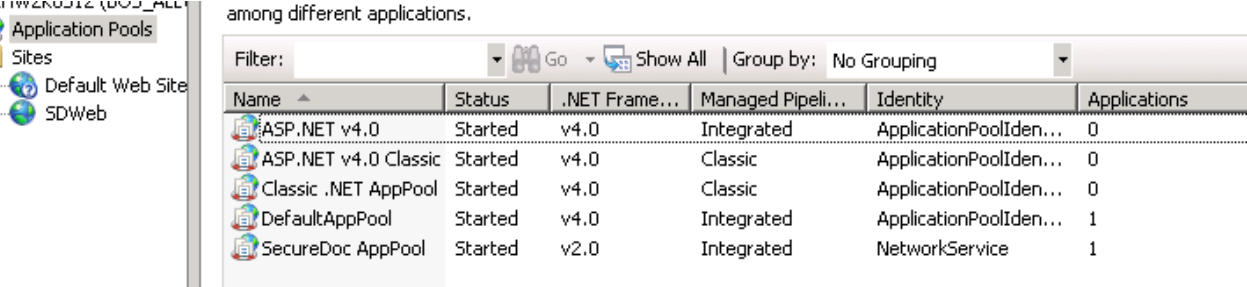
5) Click Ok
Custom Fields
- Version: SecureDoc 6.1, SecureDoc6.2, SecureDoc 6.3, SecureDoc 6.4, SecureDoc 6.5
|