Error number 0x772B - User ID is not Unique
Client may experience a situation where there may be accounts that have the same exact name (duplicate IDs) in SES console or SDWeb. This can occur where the user accounts are being moved to new OUs in Active Directory. The same account may exist in the old and new OU. Client may have to delete the disable account and then set the user as the primary user on the device.
Once the administrator delete the disabled account, the account may not appear in the SES console or in the SDWeb. However, the admin can see only the active account and the error 0x772B may continue to appear.
Solution #1:
Try empty the recycle bin in the SES console.
Solution #2:
How to change the default user (primary user) on an encrypted machine:
To change the boot order on the local client:
1. Create the key files and save them to the desired location.
2. Log in with an administrator key file (you need administrator rights in the control center).
This functionality is only available in the SecureDoc Control Center v4 GUI.
The executable is found at:
C:\program files\WinMagic\SecureDoc-NT\securdocold.exe
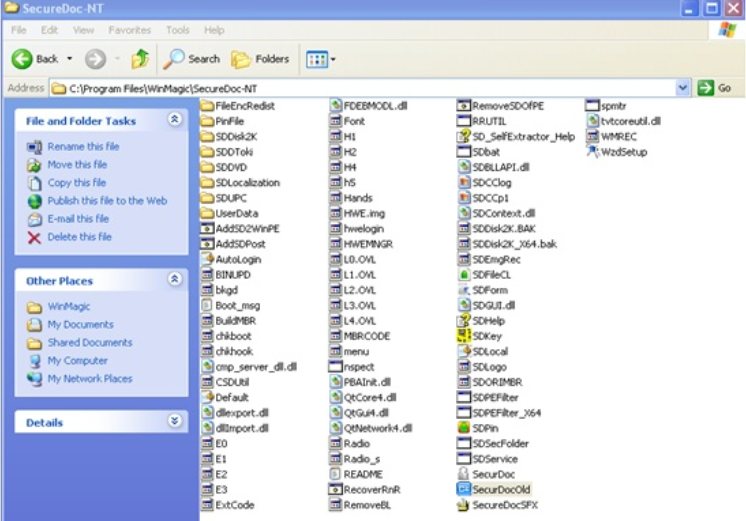
3. Click on the Boot Control tab, highlight file ID and click on Import Key File.
Select the key file to be assigned to the first slot.
Then highlight the second slot and click Import Key File.
Select the key file to be assigned to the second slot.
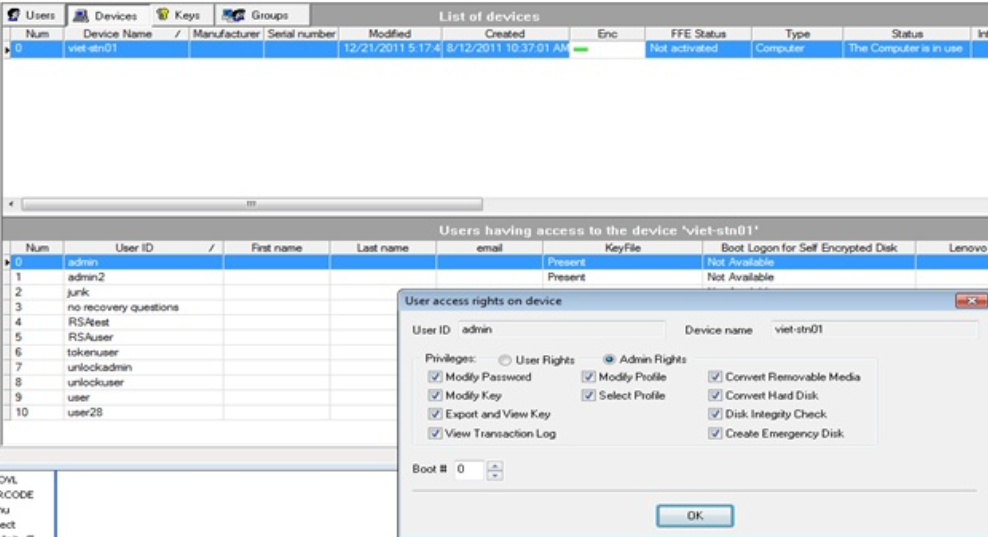
To change the boot order via SecureDoc Enterprise Server:
1. If the clients are the network, then find and double-click on the user in the lower pane of the device tab.
Change the boot # for the user then click on OK.
2. Next push down the key file to the client machine, and then restart it.
Solution 3: Please refer to KB article 410 - How to Change Boot Slots in SES