Issue: Bitlocker-encrypted device asks for Bitlocker Recovery Key AFTER authenticating at Pre-Boot but BEFORE Windows can load
Issue
Some customers have encountered an issue with Bitlocker-encrypted devices, where Bitlocker will prompt the user to enter the Bitlocker Recovery Key after the user has successfully authenticated at SecureDoc pre-boot.
The device, however, will not proceed to load Windows until after the Bitlocker Recovery key has been entered.
Cause1
WinMagic was able to determine that the reason this prompt appears is because of the use of the “Boot Menu.”
Use of this menu prevents SecureDoc from providing the necessary unlock parameters to Bitlocker, preventing access to the computer's Bitlocker-encrypted disk.
At the time of this writing (April 2015) SecureDoc does not support the use of the Boot Menu.
Cause2
The Bitlocker cypher type on the device is different from what the device profile is configured with resulting in SecureDoc preboot unable to unlock the Bitlocker encryption after successful authentication. This usually occurs when SecureDoc for Bitlocker is installed over existing Windows silent Bitlocker using 128-bit encryption.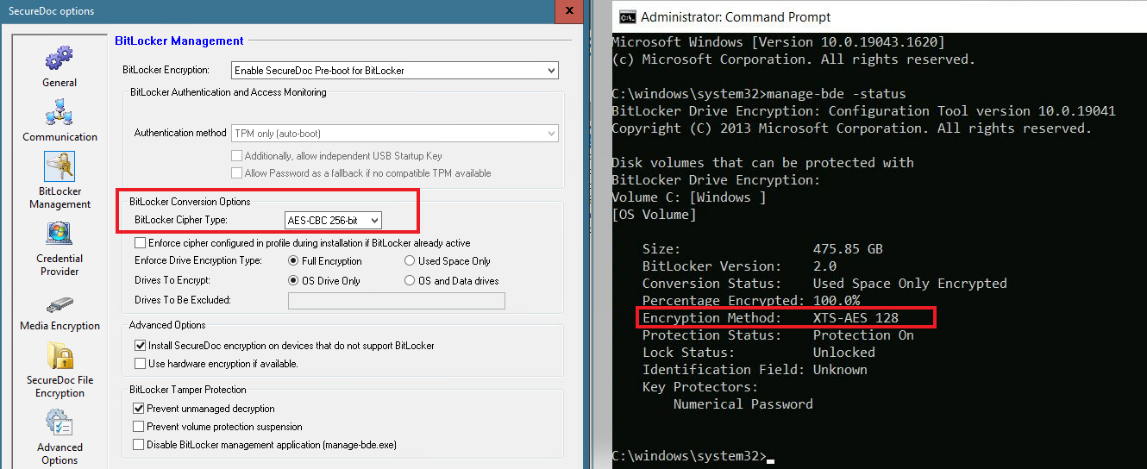
Solution for Cause1
To correct this problem, the Boot Menu must be disabled.
1 - Provide the necessary Bitlocker Recovery Key in order to get the device to boot into Windows.
Log into Windows with an account that has at least Local Admin rights.
Once in Windows, disable the boot menu (preventing it from appearing at every boot) by using the following command:
bcdedit /set {bootmgr} displaybootmenu no
Solution for Cause2
Decrypt the drive to remove the 128-bit encryption and manually encrypt the drive from the SDCC, so the correct 256-bit cipher type can be applied