Users, devices or keys do not show up in SES console
Symptom:
Users, devices or keys do not show up in respective tabs in SES console.
The items show up in the "All Folders” view, but not under the views where they are supposed to be displayed.
Probable Cause:
A null value is being assigned to the folder column for the affected set of items
Resolution:
Here are 3 scripts that can be executed to determine what users, computers and keys are affected.
select DBK_ID, DBK_Folder from tblDBKs order by DBK_Folder desc
select PC_ID, Folder from computers order by Folder desc
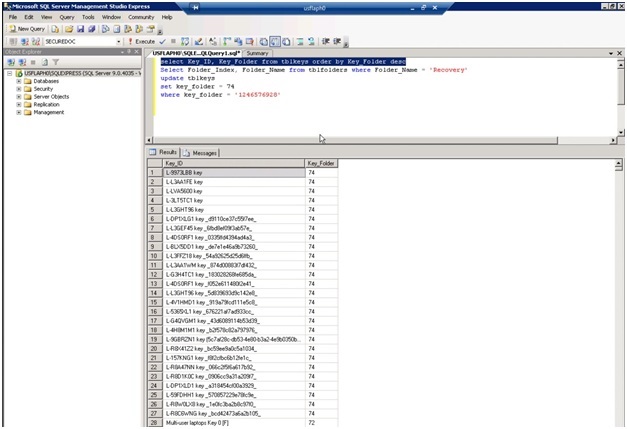
select Key_ID, Key_Folder from tblkeys order by Key_Folder desc
The number we are looking for is 1246576928 under the folder column of the 3 tables. This is a "Null” value that is being assigned to these records.
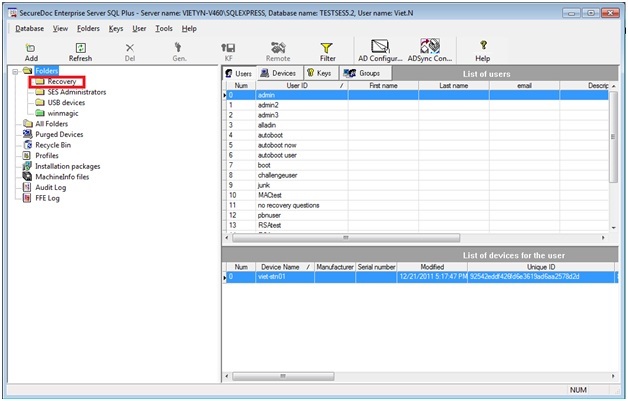
- Create a folder under the root of your SES and call it Recovery.
- Use the following script to determine the folder index #.
- Select Folder_Index, Folder_Name from tblfolders where Folder_Name = ‘Recovery’
- Then use that number in the following scripts to move all affected records into that recovery folder.
update tblkeys
set key_folder =
where key_folder = '1246576928'
update tblDBKs
set DBK_folder =
where DBK_folder = '1246576928'
update computers
set folder =
where folder = '1246576928'
Once the records have been updated, you can then use the SES to move them into the appropriate folders.
Custom Fields
Operating System: Windows Server
Version: Affects all versions of SD