Symptom:
Upgrading from a previous version of SecureDoc to version 9.0 may cause devices to disappear from the SecureDoc Enterprise Server Console. They do not show under the All Folders or anywhere else.
Cause:
An incorrect value is being assigned to the folder column for the affected set of devices during the upgrade.
Resolution:
- There is a workaround to prevent this issue before upgrading the endpoint devices to version 9.0. In the Installation Package settings -> Provisioning Rules:
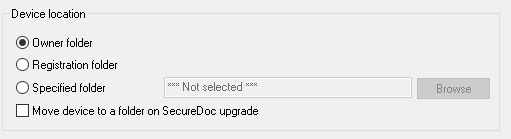
Uncheck the Move device to a folder on SecureDoc upgrade. This is checked by default.
- NOTE: BEFORE DOING ANYTHING IN YOUR DATABASE, MAKE A BACKUP FIRST. If the upgrade is already completed, you can run an update query on your SQL server. Open the Microsoft SQL Management Studio. Open your SES Database (it will be whatever name you gave it on installation, there is no default name), open the Tables, and find the dbo.Computers table.
Create a new select query with this:
select PC_ID, Folder from computers where folder = -1
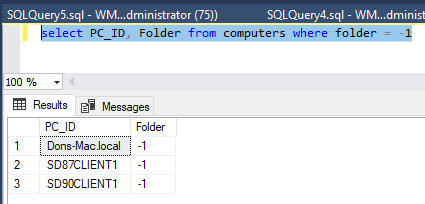
If you see entries as above, then this is the problem.
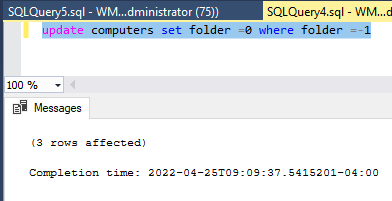
To correct you create another query which is an update query to change the -1
update computers set folder =0 where folder =-1
NOTE: there should be a fix for this issue in 9.0 SR1