Why am I getting SecureDoc Warning ‘Check SecureDoc space, SecureDoc.wmg was moved’?
Problem Scenario/Symptom
After logging into boot logon (Windows is loading), an error appears:
"Check Secure Doc space. File starts at 35173633 while fixed link is at 50048129. Error No: 9204 SecureDoc.wmg was moved." (File addresses may be different).
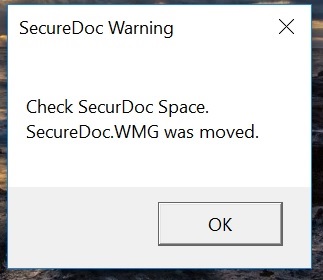
Client may also see popup message during Boot Logon as shown:
Example: SecureDoc Warning - Check SecureDoc Space. SecureDoc.WMG was moved.
Probable Cause:
It's likely that there was a program or process (e.g. Windows defrag) which may have moved the SecureDoc.WMG file.
Proposed Resolution:
- You will need to Log in at Boot Logon with an administrative key file and then log onto the SecureDoc Control Centre,
- to update Boot Logon from within the Boot Control tab.
Click on Install/Uninstall Boot Logon and then on the next dialog, click Update.
NOTE:
In the MySecureDoc Products:
LOGIN TO MYSECUREDOC CONTROL CENTER | ADMIN TAB | INSTALL / UNINSTALL BOOT LOGON | CLICKON BUTTON
Custom Fields
Article ID: TS0062
Error message or code: Error 9204 :Check SecureDoc space, SecureDoc.wmg was moved
Version: Affects all Versions