Devices Not Visible in SES Console
Summary
This article explains how to resolve an issue where devices no longer appear in the SES console. In this scenario, the total device count is correct, but the visible device count displays as zero, even though no filters are applied.
Symptoms
- The SES console shows the correct total number of devices.
- The device list appears empty.
- The “Visible Devices” count displays 0.
- No filters are enabled.
Cause
This issue is typically triggered when the device list is sorted within the SES console. Sorting can cause a registry value associated with the device grid view to become corrupted.
Resolution
To restore device visibility, remove the affected registry value.
Steps
- Open the Windows Registry Editor (regedit).
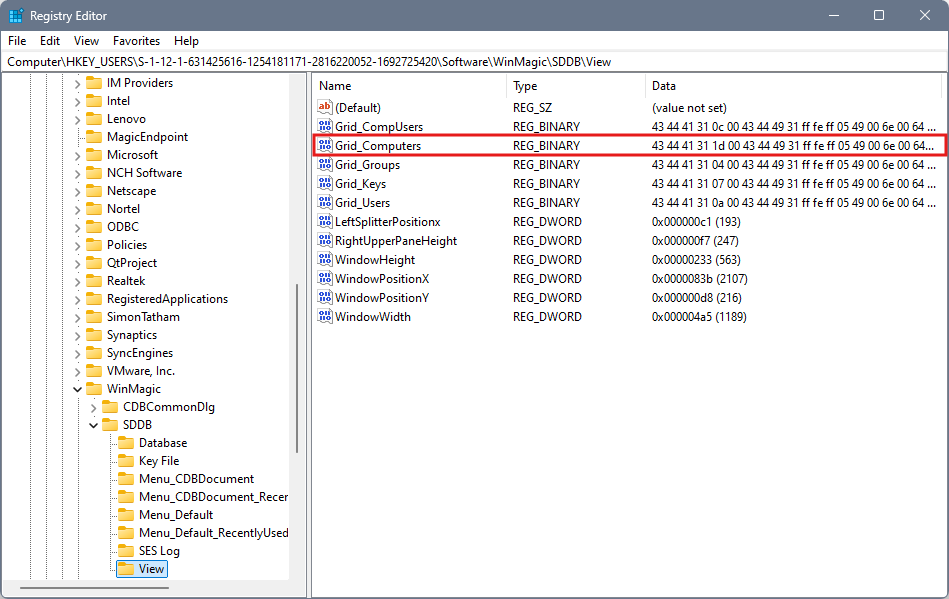
- Browse through registry entries beginning with S1 until you locate the following path:
Software → WinMagic → SDDB → View - In the View key, locate the entry named Grid Computers.
- Clear the value data for Grid Computers.
- Close the Registry Editor and reopen the SES console.
Prevention
To avoid this issue in the future, do not sort the device list within the SES console. Sorting is the most commonly action associated with triggering the problem.