Conversion to token window not coming up.
Applies to Version 9.0SR4HF1, and maybe 9.0SR4
In several cases we got reports that the Conversion to token windows did not show.
In most cases this was related to some Bluetooth issues, which does not apply to this scenario.
Scenario:
PIV Card used for Yubikey 5 (any model)
Expected behaviour:
Steps
- On SES console, go to Devices tab -> Right-click on SDUser -> Create Key File
- On dialog Create Key File -> Config with these options below:
+ Check the "Apply user password from database" option
+ Check the " Ask user to convert to token protection" option
+ Token type: PIV Card
+ Protection method: Use Certificate on token
- Click OK button
- Communicate from Client to SES successfully and check the command is executed
- Reboot Client and Plugin Yubikey 5 Nano
- Login BL with key file password successfully
--> Client boot to Windows Desktop by SSO
--> The dialog convert to token is shown
- At dialog convert, Type Key File password and Yubikey PIN
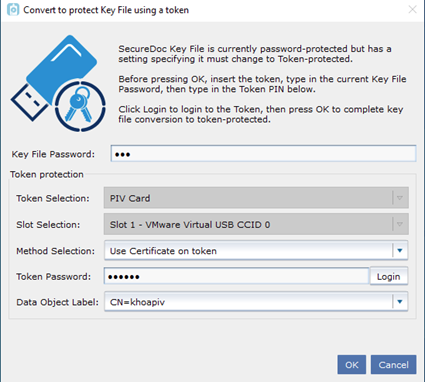
--> The SD User converts to Yubikey successfully
- Login BL and SDCC by Yubikey PIN successfully
- On SES console, at Device tab -> the SD User shown Token KeyFile protection type
Actual Result:
No conversion window appearing.
How to reproduce:
- The end-point has a password or OOB protection for a keyfile.
- The end-point has no Bluetooth support or it is disabled.
- Make sure the device has the following profile option: Phone Token in a profile
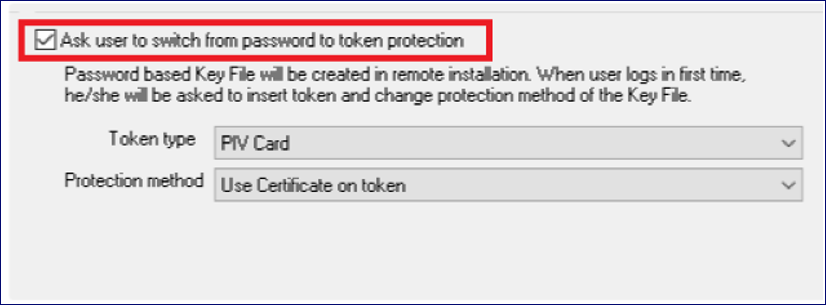
- Create and assign a keyfile for the main/boot user on that device with a option to convert to PIV token.
- Communicate Client with SES and reboot, login with that user at pre-boot
- Login or SSO to Windows
- There will be no prompt to convert to token protection shown (the bug)
The root cause is that our logic still checks for token type in a profile, although the conversion in profile is not enabled and the token type from keyfile is not a BLE one.
Internal information: This is as well related to some overwrite settings made in previous versions.
Solution: read token type from token for Bluetooth check.
The fix will be added in a context of 9.1.
Workaround for earlier versions is:
- Set the settings for token protection as desired
- Remove the hook for “Ask user to switch from password to token protection” again
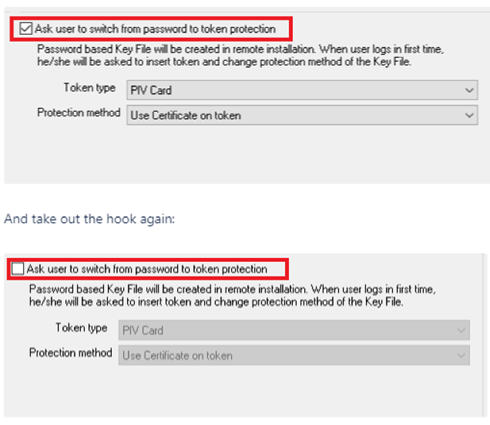
Side note: This does not happen on a fresh install on a machine with no previous SD installations, when the profile is in the installer package.
Internal Reference:
https://winmagic.atlassian.net/issues/SD-45793