DELL Logical FlowChart for KnownConfig
INTERNAL
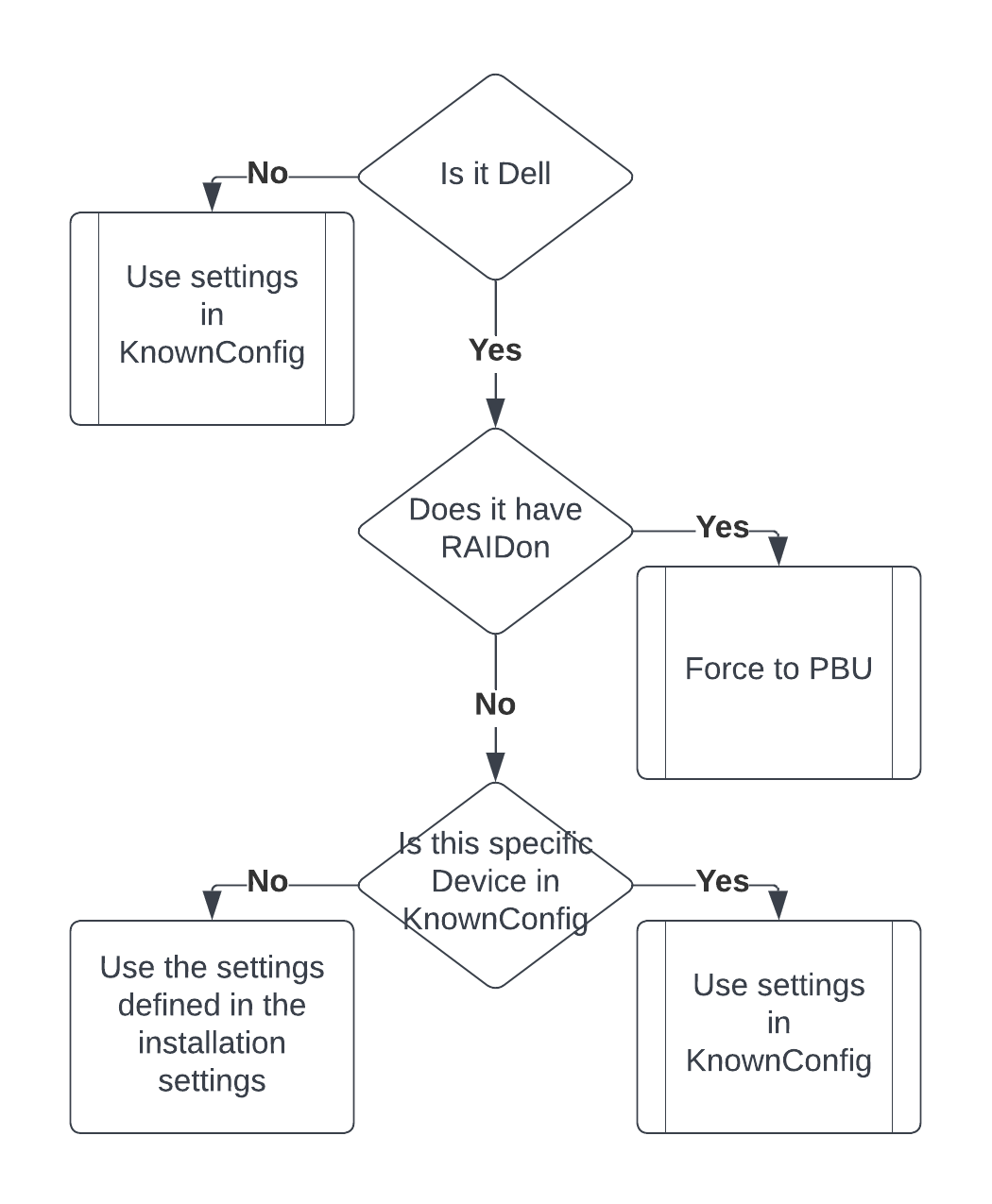
Dell has some special requirements to the settings due to the RAIDon default. So it is sometimes difficult to tell why a device is using PBU even though you selected PBLU in the profile.
This FlowChart is to explain the logic behind it.:
Warning: Even though you have the option to choose settings for a device if this logical path is correct, this does not mean it has to work.
Is it Dell -> Yes -> Does it have RAIDon -> No -> Is the model listed in KnownConfig -> No -> Use settings in Profil
It just means, we didn't test the device yet, thus do not know which are the correct settings. So the machine could still run into the known issues like BSOD, Not booting, black screen etc
Customers are strongly advised to use the SecureDoc Pre-Boot Compatibility Test Tool on any new Windows device types they have purchased (or are considering purchasing), to determine as early as possible whether such devices will be compatible with SecureDoc’s Pre-Boot Authentication. It also is recommended that you test with the KnownConfigs.XML file present.
In Version 8.3, WinMagic added an option to run any Installation Package in Pre-Boot Compatibility Test mode, which will install SecureDoc’s Pre-Boot and attempt to determine whether a given device type will be Compatible with SecureDoc’s Pre-Boot. It will also determine and report if there are any special settings that may be required to achieve a compatible Profile/Installation Package combination.
Details of how to setup, run and uninstall a Compatibility Test, as well as how to interpret the Tool’s resulting Compatibility Report can be found in the SES Administrator Guide, in Appendix F.
This link here leads to an internal article Adaptive Installation: Using known and dynamically learned XML configurations to make SecureDoc installations robust , which contains a flowchart in larger matter for handling XML data between PBA, SDClient, and SES
The up-to-date KnownConfig can be found in the KB Article Number 000001745
The instructions how to configure the SecureDoc Compatibility Test Tool in V8.6 and V8.6SR1 (and later versions) can be found in KB Article Number 000001890
Keywords: RAIDon, Dell, BSOD, KnownConfig, PBU, PBLU, AHCI