KB# | 1834 |
Title | Why is SecureDoc creating TVSU_tmp_xxxx users in the SES? |
URL Name | Why-is-SecureDoc-creating-TVSU-tmp-xxxx-users-in-the-SES |
Summary | This article explains why the TVSU_tmp users are created in the SES, and why the SDConnex is displaying a 0x7886 error in the SDConnex relating to these users. A workaround is provided to eliminate the creation of these users, and to reduce the number of 0x7886 errors in the SDConnex. |
Summary:
In the SES, you may notice a number of user account being created with the prefix TVSU_tmp.
This can also be accompanied by several 0x7886 errors in the SDConnex Event log.
Reason:
This happens due to the Windows Account feature in SecureDoc. This feature creates SecureDoc accounts based on the Windows users that log into the device. The TVSU_tmp user is specifically coming from Lenovo software called Lenovo System Update. This software creates temporary users to install the Lenovo updates that are downloaded. This user is generated as needed, and you may notice several associated with a SecureDoc device in the SES.
SecureDoc will detects this user, and will create the account in the SES, and in turn, pushes a key file for this account to the device.
When the TVSU_tmp user is created, the SDConnex will also attempt to authenticate the user against Active Directory. This will cause 0x7886 errors to be displayed in the SDConnex Event log.
Solution:
There are two workarounds for this issue. The first is to remove the Lenovo System Update software, or ensure you are using the latest version of the software.
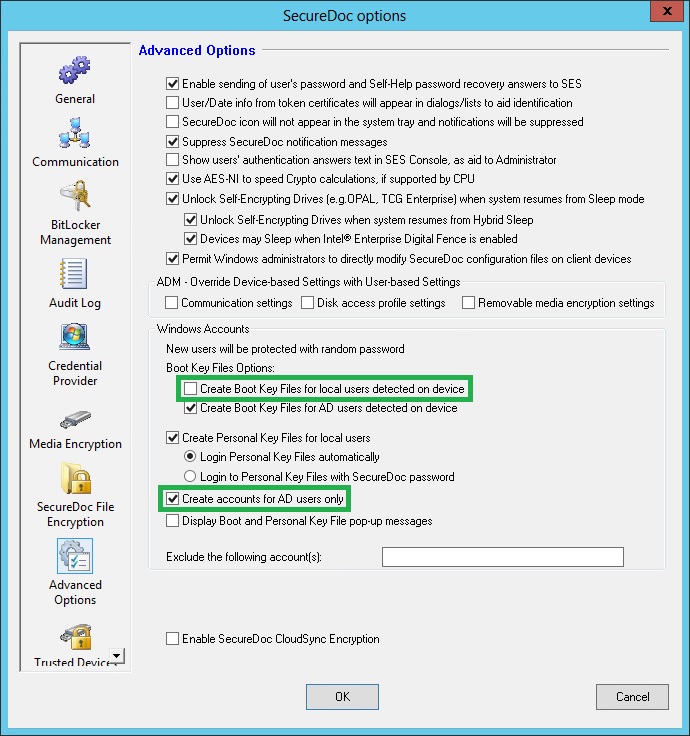
As the user is a local user to the device, the second solution is to modify the profile to disable “Create Boot Key Files for local users detected on device” and to enable “Create accounts for AD users only”
Once the profile is update, it can be assigned to the devices.