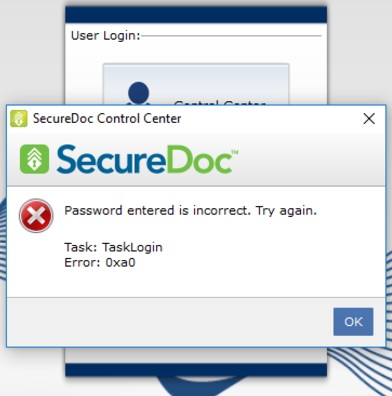
Why am I unable to login to SecureDoc Control Center after performing a Challeng Response on a second user with Fast Startup enabled?
Article Summary:
When a user performs Challenge Response from SecureDoc Control Center in Windows, and resets their password, after thefirst restart of the system, the user observes that they can log into Boot Logon with their new password - however noticed that they're unable to login into SecureDoc Control Center.
Resolution:
This currently is a known limitation with "Fast Startup" feature.
In order to resolve, whenever you perform a Challenge Response, you will need to fully shutdown and power off the device 1st and then restart.
Included for reference to this article, these are the steps which explains how this issue is reproduced:
1. Launch SecureDoc Control Center (SDCC).
2. Perform a Challenge Response for user default (for this example - user will be Win10RS2)
3. A "recover password" pop-up occurs because user has "modify password" rights.
4. User "Win10RS2" is logged SDCC by new password successfully
5. Shutdown and Restart the Windows device
At this stage, the user will be presented with Boot Logon (BL) Screen upon restart of the device.
6. Login to Boot Logon screen with user "Win10RS2" with new password successful
7. Login to SecureDoc Control Center with user "Win10RS2"" with new password
End Result:
Expected result: The user Win10RS2 who logged into SecureDoc Control Center should have been successful without error however…
Actual result: user was unable to login to SDCC as they received the following error instead: "Password entered is incorrect. Try again"