Topic:
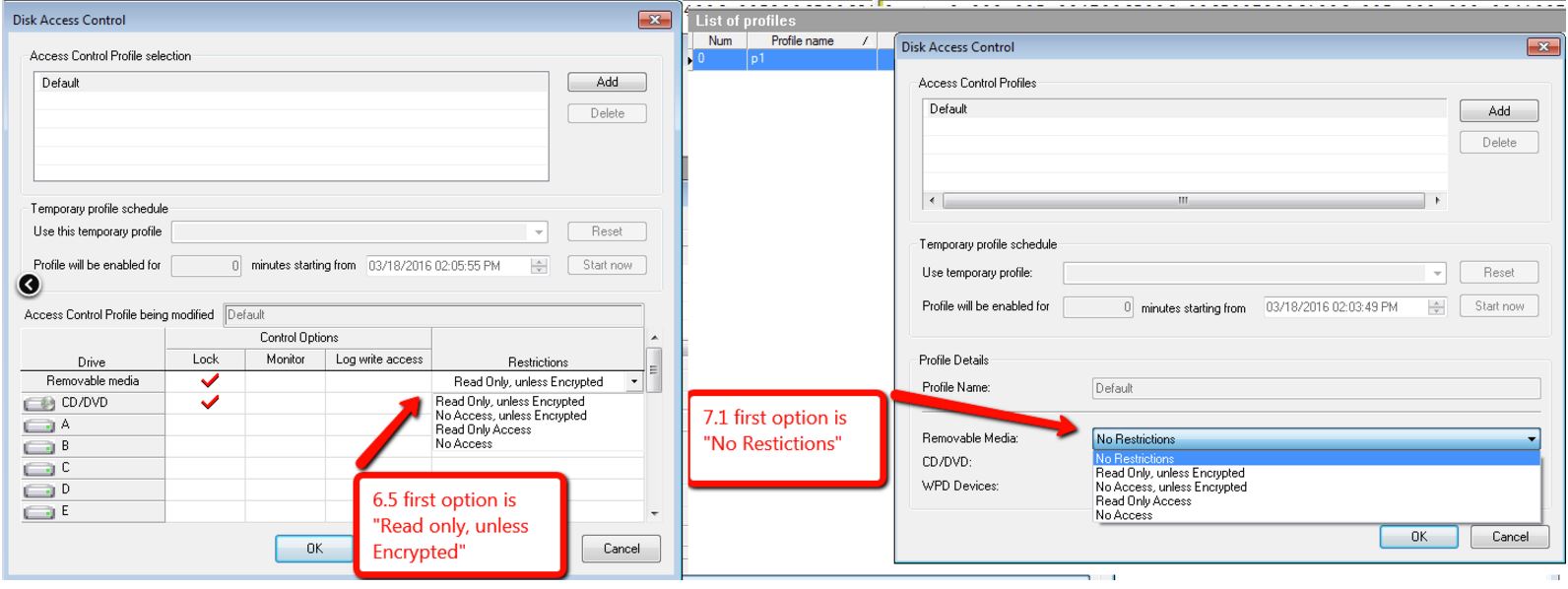
Please note that starting with SES/SD 7.1, a new GUI description "No Restrictions" was added to Disk Access Control Restriction category.
Any SD older than 6.5 the first option is "Read Only, Unless Encrypted", and to achieve a state where there would be no restrictions, one would have to ensure that the Lock column had no check mark (effectively inactivating Disk Access Control for that object type.
With 7.1 or newer, Winmagic has set the first option "No Restrictions" to be the rule, which is functionally equivalent to a row with no lock rules defined. Compare the pre-V7.1 user interface (at left, below) to the V7.1 (and subsequent) user interface at right.
Product version affected:
SES/SD 7.1 and newer
Environment (OS/hardware/software):
All Windows OS and devices
References:
SD-17510
KB 1501 - HOW TO: Setup Disk Access Control from 7.1 SecureDoc Control Center
KB 1502 - HOW TO: Setup Disk Access Control from 6.5 and Older SecureDoc Control Center
1631 SES 7.1 New GUI Description (No Restrictions) Added for Disk Access Control
- Updated on Feb 6, 2026
- 1 minute(s) read
- VN
Was this article helpful?