Delay recognizing USB Storage devices on SecureDoc Windows client
Issue
Long delay with Windows systems recognizing a USB storage device in SecureDoc 6.5 and later.
Symptoms:
Customers insert a USB storage device, and it takes 1-2 min to recognize device in Windows Explorer.
If the customer stops SDPin.exe, it becomes available right away.
Root Cause:
The SDDisk2k kernel module sends a command (IDENTIFY_DEVICE) request when a USB disk is detected with default "HDC_TIMEOUT" set to 20s.
This command is used to determine if the USB connected is an OPAL removable media or not.
If the USB drive is not an OPAL removable media it cannot recognize this ATA command thus will time out and causes the detection delay.
Affected Product versions:
SecureDoc 6.5 and later
Environment (OS/Hardware/Software)
USB Flash drives on 2.0 and 3.0
All Windows OS and Devices
Information gathering and Troubleshooting
- Identify the USB Device Type
- Confirm whether the device is OPAL or non-OPAL removable media.
- Verify System Settings
- Ensure Port Control/DAC is enabled.
- Confirm SFE is enabled.
- Check that USB drivers are up to date.
- Collect Required Logs
- Export Application Event Viewer logs.
- Retrieve the User Data folder.
- Generate and save the MSInfo32 report.
Resolution
If the customer is using SD 6.5 or newer, and non-OPAL removable media devices, then please add the registry DWORD entry called USBSEDDetect, set this to 0 under the following location:
- [HKEY_LOCAL_MACHINE\SYSTEM\CurrentControlSet\services\SDDisk2k\Parameters].
By setting the registry value to 0, it will disable OPAL removable media detection on the device.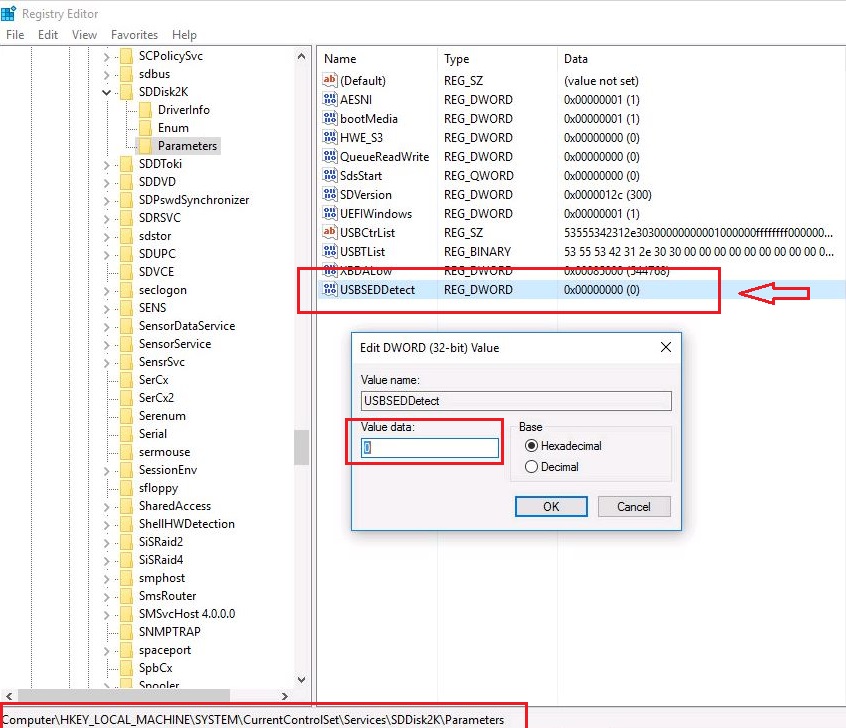
Internal Reference
SD-12643
SD-13421