Case Scenario:
This How-To Article provides the troubleshooting steps in resolving devices not able to communicate with the SES Server.
Product version affected:
All SD versions
Environment (OS/hardware/software):
All Windows OS and devices
Symptoms:
- SES Console indicates that a client computer did not receive a profile
- SD Control Centre does not start
Basic Troubleshooting:
From the Device side:
- Verify if SDService.exe is running or not
- The telnet command: telnet <ses server> 7300 (SES server ip address)
- Delete any Sdsend.dat and ~sdsend.dat
- Delete both SDRemControl.log, SDSrvRemCtrl.log
- Then have system restart and communicate
- Verify if SES IP address in securedoc.ini is correct or not
From the SES server side:
- Restart the SDConnex Service
- Verify if there are any errors in the SDConnex event viewer log
- Cleared the SDConnex eventlogs and then tried to force communicate the device.
- Check the SDConnex and ADSync services are running or not
Starting with 6.4 SR1, it is not possible to stop the service manually without having to rename sdservice.exe and killing the process.
The service should communicate on its own immediately after starting.
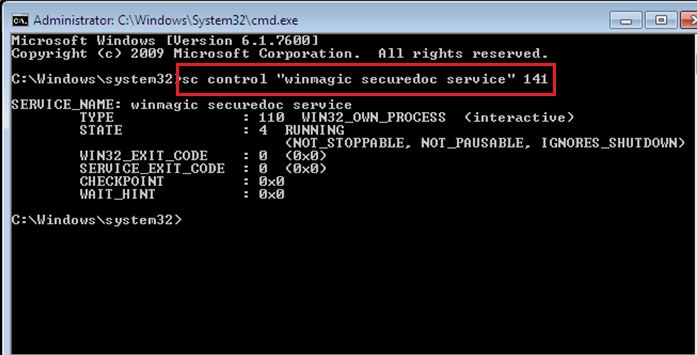
1) Open Windows Command prompt as administrator
2) Type the following out put sc control “winmagic securedoc service” 141
3) Hit enter and client will now force to communicate with server
Procedures for the Root Cause Analysis:
It’s not simple in providing the root cause analysis
If a customer would like to know the cause of the miscommunication problem, then Support team would require the following:
1) SDConnex detailed trace log when issue occurred
2) Service debug logs enabled on client side
3) Original files that were deleted (backed up or renamed to old)
4) New files that would have been recreated
Most likely some of the data inside the deleted files was corrupt and not properly handled.
Deleting the files forces client to re-create new ones
Reference Materials:
KB 1513: How to Force Windows client to Communicate with SES server
1616 Steps to Troubleshoot why Client Devices Can't Communicate to Server
- Updated on Feb 6, 2026
- 1 minute(s) read
- VN
Was this article helpful?