Issue:
This article addresses a limitation specific to SED OPAL drives, where hybrid sleep mode is enabled and does not work properly.
Symptom:
System resumes from hybrid sleep but freeze at Windows desktop. System may crash and then must be rebooted.
Probable Causes:
a. Profile having the following options enabled: "Unlock Self-Encrypting Drives (OPAL and DriveTrust) when system resumes from Sleep mode" and "Unlock Self-Encrypting Drives when system resumes from Hybrid Sleep".
b. 'Hybrid sleep' is enabled in the device's power options
c. Incompatible AMD drivers may be installed in the device.
Product version affected:
SD 5.x and up
Environment (OS/hardware/software):
- HP ProBook 6475b, Lenovo x230t, W530 and T430
- Windows 7 32/64 bits
- AHCI and legacy mode
- SED OPAL and DriveTrust drives
- Profile setting: Under Advanced Options > "Unlock Self-Encrypting Drives (OPAL and DriveTrust) when system resumes from Sleep mode" and "Unlock Self-Encrypting Drives when system resumes from Hybrid Sleep".
- In Windows OS: Hybrid Sleep enabled in power options.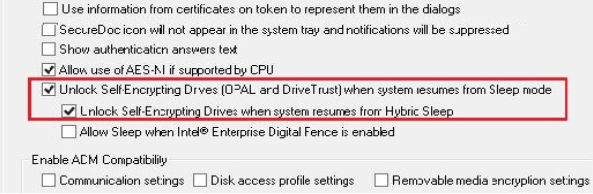
Informational Gathering and Troubleshooting:
a. Make and model of SED HDD and Device (computer hosting the drive)
b. Firmware version of the SED
c. Intel Rapid Storage Technology driver version
d. Intel or AMD based SATA driver
e. Determine if enable/disable hybrid sleep in Windows Power Options fixed the issue or not.
f. Collect a full Crash Dump log file
Resolution:
- If it is an AMD SATA driver, then try upgrading the AMD SATA driver to a newer version (if one is available) to see if it will resolve the issue or not.
Note:
This issue has been traced to an AMD SATA driver issue. It is recommended to upgrade the AMD SATA driver to a newer version if one is available or becomes available, to determine if this will resolves the issue or not.
- Disable hybrid sleep in Windows Power Options
- Disable the profile options: "Unlock Self-Encrypting Drives (OPAL and DriveTrust) when system resumes from Sleep mode" and "Unlock Self-Encrypting Drives when system resumes from Hybrid Sleep".
Limitation:
HP ProBook 6475b device with AMD SATA drivers have been known to have this issue
Internal Reference:
SD-187
SD-1806
SD-16275