Topic:
This article outlines the requirements for configuring the use of certificate on token.
This certificate is intended for use with SecureDoc Device encryption and smartcard example RSA SID 800 USB to accomplish two factor authentications during the pre-boot logon.
Product version affected:
SD 5.3SR4 supports up to 1024 bit encryption
From SD 6.1 to latest 7.1SR1 – supports up to 2048 bit encryption
Environment (OS/hardware/software):
Windows OS and devices
Smartcard Examples:
- Gemalto .Net v2+ SmartCard (USB token)
- RSA SID 800
Certificate Requirements:
Since v.4.0 SecureDoc has enforced a policy on certificate allowed to be used for key file protection. The policy includes the following:
- The certificate must not be expired.
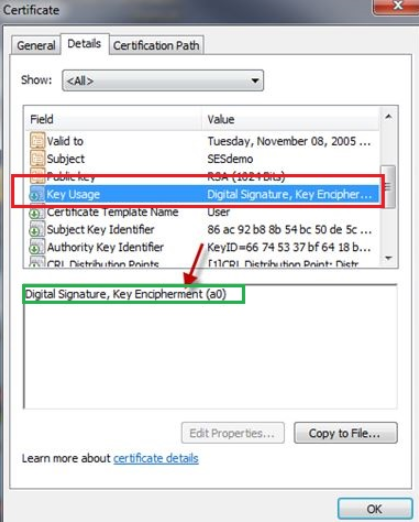
- The certificate should contain appropriate Key Usage attribute. SecureDoc consider a certificate appropriate for encryption if Key Usage value includes Data or Key Encipherment or both.
- Key size should be 1024 - 4096 bits.
- Certificate taken from file should be in DER-encoded format.
- To invoke certificate validation (optional) the certificate has to comply with X.509v3 standard.
- All requirements may be checked visually by opening the certificate (from .cer / .crt file or through certificate store) in Windows and looking into Details tab.
Depending on the smartcard used with SD, SD will only support certificate instead of PIN protection (Example: RSA SID 800 token).
Steps to follow:
The certificate should be set for 'Key Encipherment'
To use certificates for authentication at Preboot, SecureDoc requires the following Advanced Key Usage:
- Digital Signature
- Key Encipherment.
SecureDoc requires x.509 certs and can support 1024 or 2048-bit certificates (support of cert strength depends on smartcard/reader).
Additional References Materials:
Please refer page 129 (Appendix B: Protection Methods) in the user manual.
http://downloads.winmagic.info/manuals/SecureDoc_Standalone_v71_User_Manual.pdf