Issue: When turning the hardware wireless toggle switch off on Dell devices, wireless connection is still turned on. The wireless switch needs to be flipped on and then back to off in order to turn off the radio.
Environment (OS/hardware/software): Windows 7 32 and 64 bit
Reported devices: Dell Latitude E5430 and E6530 SED/OPAL drives Profile is set to "Use WI-FI connection" with PBConnex enabled
Reproduced steps: 1. Create a profile and deploy the package with default settings 2. Install the boot logon and encrypt the device 3. Enable PBConnex, setup wireless connection at preboot and use PBN user account to login at preboot successfully 4. After logging into Windows, turn the wireless switch off and reboot the device 5. At preboot screen, the wireless settings should pick up router automatically and obtain an IP address 6. Notice the wifi turned on again after logging into Windows
Solution/Workaround:
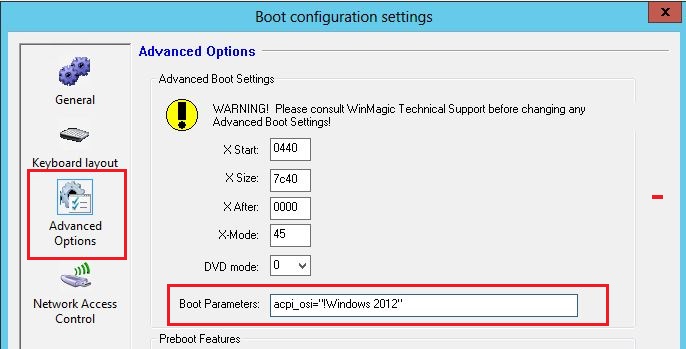
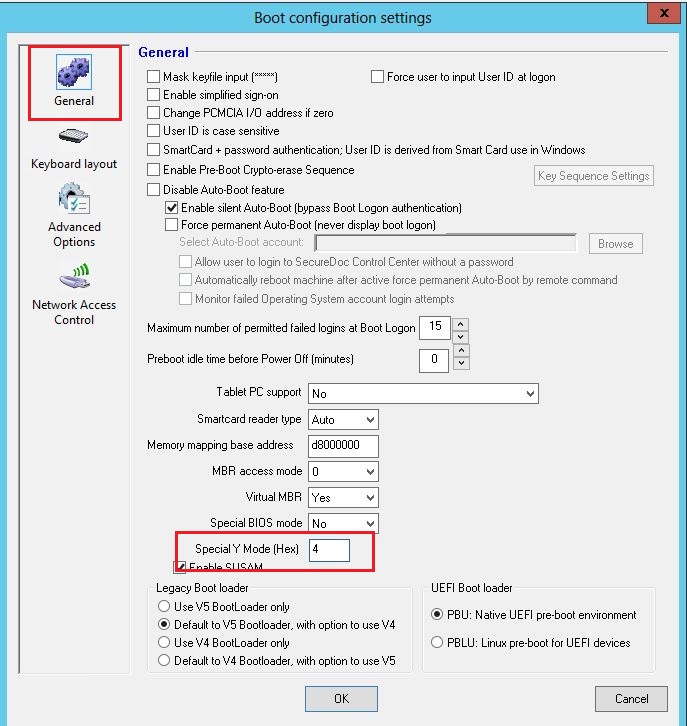
Workaround 1: Add the following parameter into Boot Configuration --> Advance options --> Boot Parameters --> acpi_osi="!Windows 2012" Workaround 2: Change Boot Configuration --> Ymode = 04 (This may resolved the wireless issue but caused a problem with single sign on due several specific SED drives) Workaround 2 will fix if device has regular SATA drive. Explanation: Some devices have the wireless toggle that uses hardware switch but it's actually software controlled, so it can be triggered by some applications such as our PBConnex which triggers this toggle.