Issue: Clients are unable to view Users under Devices in SESweb after 6.5 upgrade.
Symptoms: After upgrading the SES to 6.5 (or even a fresh SES 6.5 install) the SESWeb could not display users under Device.
Product version affected: Upgrade to 6.5 version
Environment (OS/hardware/software): Server 2008\2012 SQL 2008\2012 IE\FireFox\Chrome
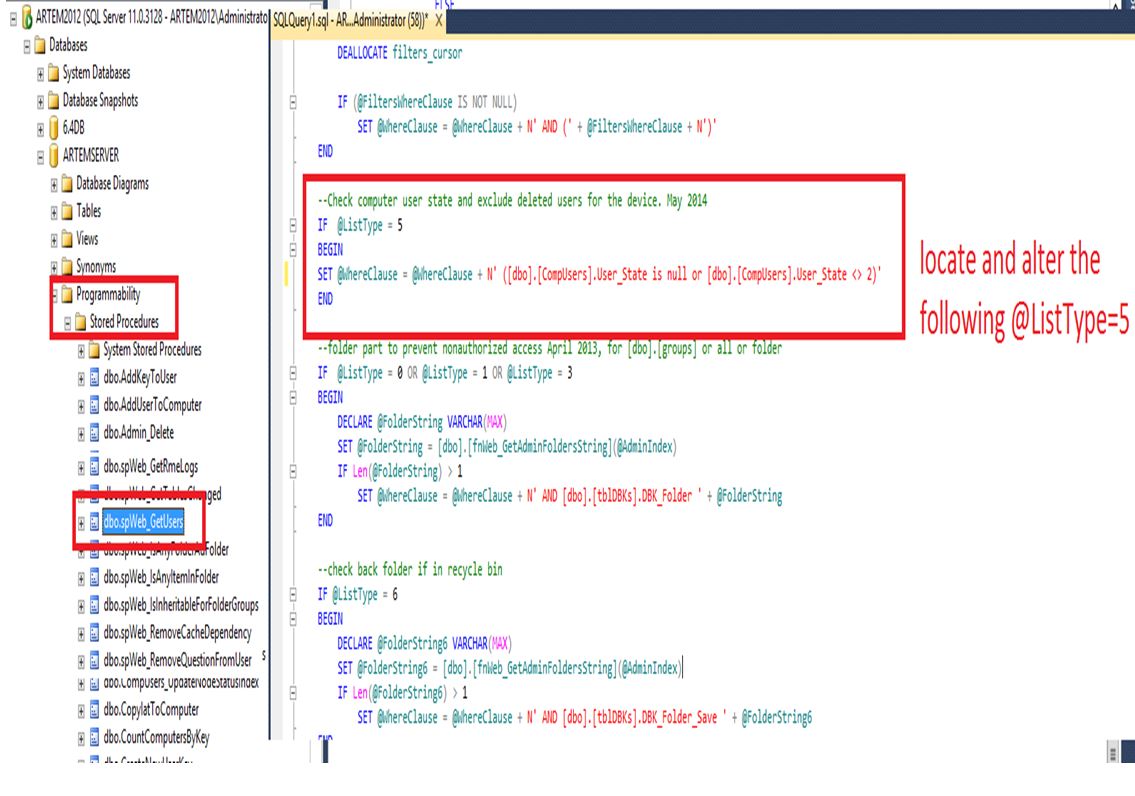
Solution/Workaround: 1)Ensure your 6.5 SQL database is backed up 2)Open SQL Database 3)located Programmability >Stored Procedures 4)Locate dbo.spWeb_GetUSers 5) alter the following line from IF @ListType = 5 BEGIN SET @WhereClause = @WhereClause + N' AND [dbo].[CompUsers].User_State <> 2 ' END To IF @ListType = 5 BEGIN SET @WhereClause = @WhereClause + N'AND ([dbo].[CompUsers].User_State IS NULL OR [dbo].[CompUsers].User_State <> 2)' END 6)Execute Stored Procedure 7) Try running SESWEB and look at users for another device (preferable new device you haven’t tried to display yet)
 Permanent Fix: