SQL Rights and Windows managed service accounts requirements for the SES
Overview
This article outlines the SQL permissions and Windows service account rights required to operate the SecureDoc Enterprise Server (SES) Console and its associated services. It also details the necessary privileges for installation, upgrades, and ongoing administration.
1. SQL Rights Requirements
1.1 Day‑to‑Day SES Console Operation
The following SQL database roles are required for normal SES Console usage:
- db_datareader
- db_datawriter
1.2 SES Installation and Upgrade
During installation or upgrade of SES, elevated SQL permissions are required:
- Database Role: db_owner
- Server Role: db_creator
Note: Administrators performing a server upgrade must have these privileges elevated on the SQL instance hosting the SES database.
2. SQL Accounts Required for SES Services
2.1 SDConnex Service
- Requires a dedicated SQL account
- Must have day‑to‑day privileges (db_datareader, db_datawriter)
2.2 SES Console Administrator
- Each SES Console administrator requires an SQL account
- Must have day‑to‑day privileges
2.3 ADSync Service
- Requires an SQL account (may use the same account as SDConnex)
- Must have day‑to‑day privileges
- SQL 2005 only: Requires db_executor role
2.4 Online Password Recovery Service
- Requires an SQL account with:
- db_datareader
2.5 WebReporter Service
- Requires an SQL account with:
- db_datareader
3. Windows Rights Requirements
3.1 SDConnex Service
- Runs under Local System Account
- Required to start and operate the SDConnex service
3.2 SES Console Administrator
- Must be a Domain or Local Windows Administrator
3.3 ADSync Service
- Requires:
- Local System Account to start the ADSync service
- Domain user/service account with permissions to connect to Active Directory for synchronization
4. Verifying SQL Privileges in SQL Server Management Studio (SSMS)
To confirm that the correct SQL permissions are applied:
- Open SQL Server Management Studio (SSMS).
- Navigate to:
Security → Logins → BUILTIN\Users → User Mapping - Select the SES database (e.g., SESDB).
- Ensure the following roles are checked:
- db_owner
- public
- SD_admin
- SD_user
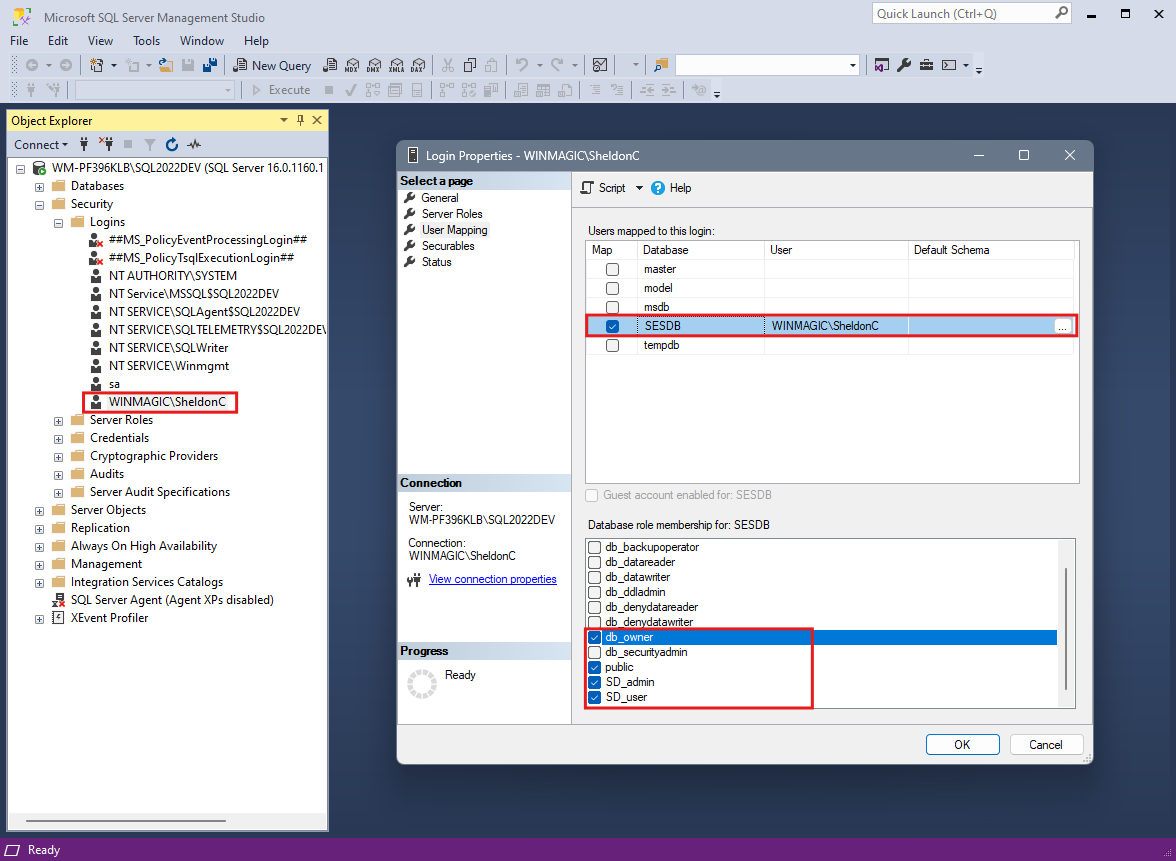
Repeat the same verification for individual administrator accounts (e.g., WINMAGIC\SheldonC).