How to limit/filter which AD Groups to import based on a defined string within the group name
Certain customers may have a great many AD Security Groups, not all of which may be necessary for import from Active Directory into.
To achieve this, you must add a new parameter in ADSync that will define this filter.
In this example, only groups that contain the characters “-sn-“ in the group name will be synchronized through ADSync.
For Example: a group whose name is COXYZ-SN-PDQ would sync, but CO-XYZPDQ would not.
Filter Definition
Stop the ADSync Service so that it will use the new settings when it restarts.
Open the ADSync Service definition. To do this:
1 - Right-click on the domain name (this will be the second line down in the tree-view, and will have the words [Directory Server] following the domain name
2 - In the pop-up menu that will appear, select the "Parameter Settings" option. (see Figure 1, below) 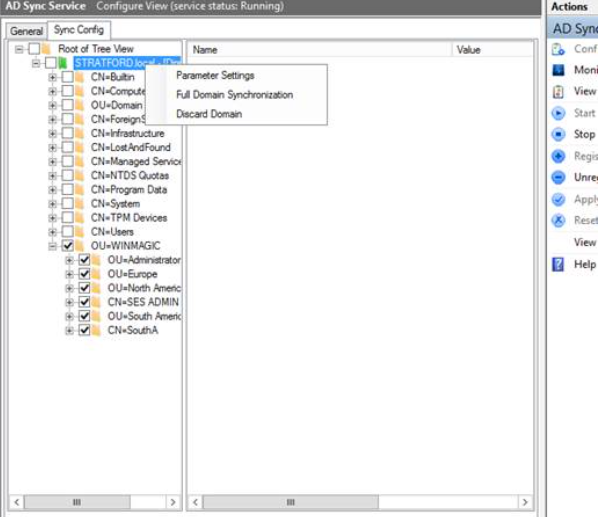
Figure 1 - Menu option to access Parameter Settings
In the panel that will appear, add the following to the lower panel area (since you will be adding a non-default setting) 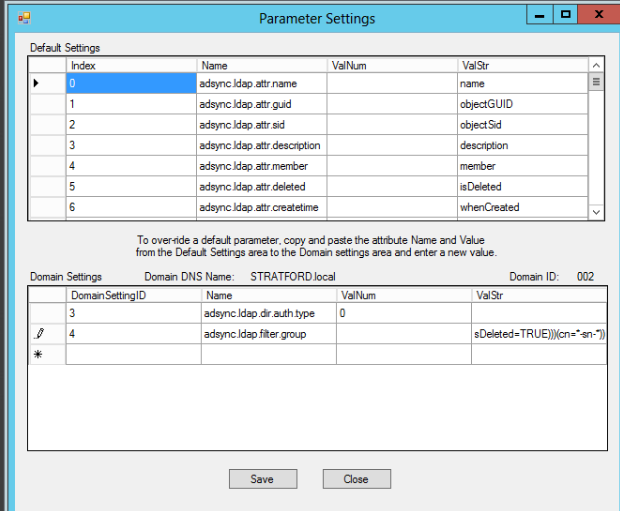
Figure 2 - Example showing adsync.ldap.filter.group definition added to Parameters list
NOTE: there are four columns:
DomainSettingID, Name, Valnum and Valstr
Having defined the string element to which the import is to be limited, copy/paste the values into the Name and Valstr columns, respectively.
e.g. Example 1 - Select and import only AD groups that contain the characters "-sn-"
Name: adsync.ldap.filter.group
ValStr: (&(&(objectClass=group)(|(objectCategory=group)(isDeleted=TRUE)))(cn=*-sn-*))
Your screen should now look somewhat like Figure 2, above.
If you wish to select two filter definitions, here's an example of how that looks:
e.g. Example 1 - Select and import only AD groups that contain the characters "-sn-" or the characters "-aa-"
Name: adsync.ldap.filter.group
ValStr: (&(objectClass=group)(|(objectCategory=group))(|(cn=*-sn-*)(cn=*-aa-*)(isDeleted=TRUE)))
Another example:
- Stop the ADSync service
- Within the SES Console, click Tools, Options, General, and uncheck the option "Do not import groups"
- Within SecureDoc Services Configuration, right-click your ADSync service, click Configure, and click the Sync Config tab
- Right-click the domain from which you want to import a specific group(s) and click "Parameter Settings"
- Click yes to the warning prompt
- In the lower pane, DomainSettingID 2, Name column, enter the following value adsync.ldap.filter.group
- In the ValStr column to the right, enter one of the following strings:
If you have one specific group; eg. (&(&(objectClass=group)(|(objectCategory=group)(isDeleted=TRUE)))(cn=GroupName))
If you have more than one group; e.g. (&(&(objectClass=group)(|(objectCategory=group)(isDeleted=TRUE)))(|(cn=Group1)(cn=Group2)(cn=Group3)))
If you have a group that has spaces in its name; e.g. (&(&(objectClass=group)(|(objectCategory=group)(isDeleted=TRUE)))(cn=Group*Name))
Click the Save button and restart the ADSync service