1342 Server Alias Setup

Prev Next

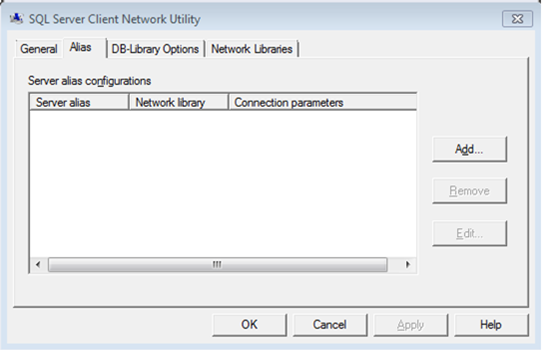
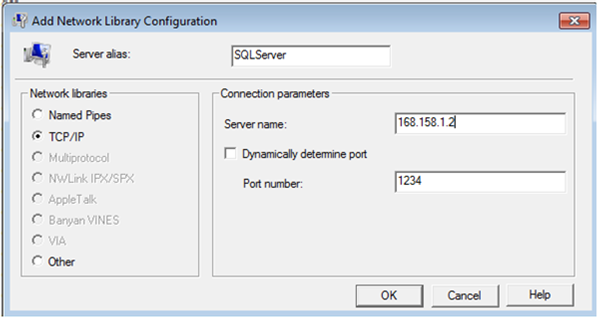
If an alternate SQL port is to be used or if IPV6 is to be used to connect to the SQL server where the SES Database resides a server alias will need to be setup. To do so, please follow the instructions below:

The following directories are used to setup the server aliases (for 32- or 64-bit OS): 

  • C:\Windows\System32\cliconfig.exe or
  • C:\Windows\syswow64\cliconfig for 64-bit windows

 Note: 

  • This is done on the SES Server, or any Servers running SES components. This is NOT done on the Database Server.
  • The cliconfig.exe utility is build-specific (32-bit and 64-bit); that is, depending upon the cliconfig build used, it will set either a 32-bit or 64-bit alias.
  • On a 32-bit OS you cannot run a 64-bit client app, but on a 64-bit OS you can have either 32- or 64-bit apps using a 32-bit or 64-bit SQL client. Depending upon the SQL client library version (32- or 64-bit) being used, the appropriate cliconfg.exe will need to be used.
    • For example, SharePoint 2010 uses 64-bit SQL client and SQL Server 2008/R2 Management Studio itself is a 32-bit app and uses a 32-bit client to connect to SQL.

 Examples: 

  • For 64 bit client aliasing (or if running on a 32-bit OS), use cliconfg.exe from system32 (already in path and you can just type and run).
  • For 32 bit client aliasing on a 64-bit OS switch to C:\Windows\SysWOW64 folder and run cliconfg.exe from there.

 A screenshot of a computer  AI-generated content may be incorrect.

 A screenshot of a computer  AI-generated content may be incorrect.

REGEDIT4

[HKEY_LOCAL_MACHINE\Software\WinMagic\Options]

"ManualSqlFQDN"=dword:00000001 

  • The old license file will need to be deleted if it exists.
  • Launch SES Console and then configure it using the alias in place of the SQL name for database connection.
  • Request a license file by going to the following website: https://www.winmagic.com/license-key-request
  • Once a new license is obtained, load that license file into SES via SES Console’s Global settings License panel.
  • In SDConnex/ADSync Configuration, use the same SQL alias in place of the SQL Name. 
  1. Add the following into the registry: 

Custom Fields

  • Operating System: Windows
  • Version: Affects all versions of SD