Displaying all the Information in the Audit Log in SES
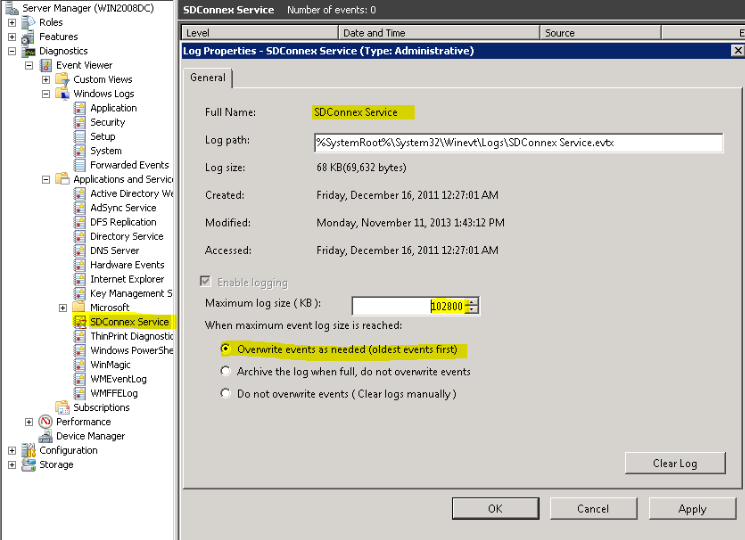
Issue: Inside the SES Audit logs, there are audit events missing. Symptoms: In the SDConnex event logs / SVCTrace logs, the following error is displayed: Error when logging audit event; continuing... EventLogEntryTypetype, String[] strings, Byte[] rawData, String currentMachineName) at System.Diagnostics.EventLog.WriteEntry(String message, EventLogEntryType type, Int32 eventID, Int16 category, Byte[] rawData) at System.Diagnostics.EventLog.WriteEntry(String source, String message, EventLogEntryType type, Int32 eventID, Int16 category, Byte[] rawData) at System.Diagnostics.EventLog.WriteEntry(String source, String message) at WinMagic.SecureDoc.Model.DataAccess.EventLogDao.WriteLog(EventLog log) at WinMagic.SecureDoc.Service.AuditLogService.LogEvent(Int32 applicationId, String applicationUser, Int32 applicationUserIndex, String applicationDeviceId, Int32 eventId, Int32 status, Int32 objectTypeId, String objectId, Int32 objectIndex, Int32 refObjectTypeId, String refObjectId, Int32 refObjectIndex, DateTime eventDateTime, String description, Byte[] dataBuffer) at WinMagic.SecureDoc.Service.AuditLogService.Log(Int32 eventId, Int32 status, Object mainObject, Object referredObject, Byte[] dataBuffer, Object[] vars)
|
Custom Fields
|