How to Enable Partition Encryption
Article Summary
SecureDoc offers the ability to do partition encryption.
This may be appropriate if the user does not want to encrypt all partitions on a disk.
Please remember that partition encryption is typically not recommended for a system drive (usually C:) because that is where the system will typically also store swap files, temp files (and unencrypted, at-risk data can be forensically recovered from these areas). As such, it is not as secure as full disk encryption unless Windows can be setup to have the swap files or temporary files stored on a different, encrypted partition rather than the System disk.
Enable Partition Encryption:
In the profile in General section
1. Select Encrypt Partition Only
2. Select the Disks for these partitions (Boot Disk Only or Boot and All fixed Disks)
3. (Optional) Exclude any partitions is desired by using the Disk Label (not the drive letter)
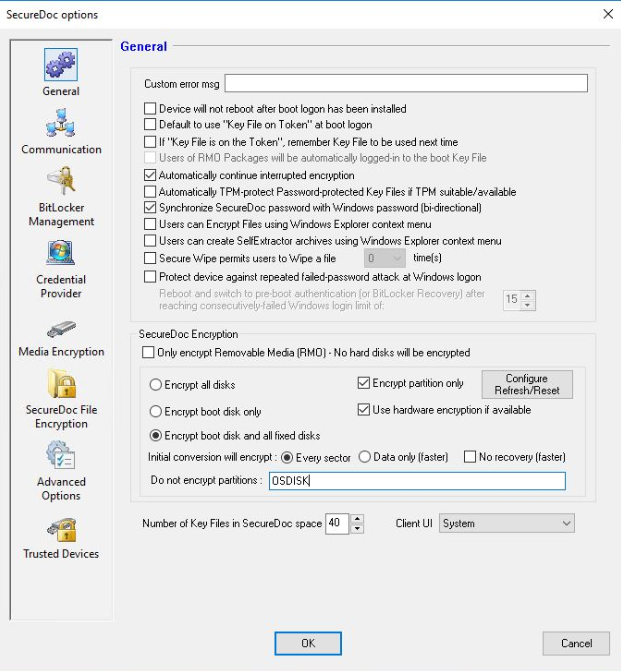
Note about the DISK LABEL.
The Disk Label is not the drive letter but the name of the volume. You can see this in Windows File explorer, Disk Management or in diskpart using the LIST VOL command. 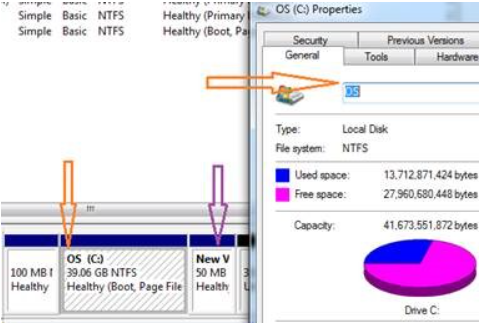
Custom Fields
• Operating System: Windows