How to decouple Reboot following installation of Pre-Boot from Reboot following completion of initial encryption. Work-around for V6.5
Issue
In Version V6.5 of SES the options for "Restart device when encryption is completed" and "Wait for the file distribution software to reboot the system" have been inadvertently partially joined.
If the option "Wait for the file distribution software to reboot the system" is selected/enabled, the option "Restart device when encryption is completed" will (incorrectly) also be enabled. Note that the reverse is NOT true. This will be corrected in a forthcoming version.
NOTE: This issue affects ONLY version V6.5 of SES.
Description
The option "Restart device when encryption is completed" determines whether the device is to automatically restart the device at end of encryption, normally intended to force the user to authenticate once as soon as possible following the completion of initial encryption. This option takes effect at the end of the installation process (following completion of encryption). Often customers may elect to enable this option so as to avoid having to interrupt their users' working day, opting instead to allow the user to reboot at a convenient time, or lastly to use the user's normal end-of-day shutdown as part of the reboot following completion of encryption. This option CAN be selected by itself.
The option "Wait for the file distribution software to reboot the system" affects whether the SecureDoc client installation process should wait for the software installation product to to reboot the computer, or for the SecureDoc client installer to automatically reboot the computer itself. Tis reboot/restart option deals with the installation of the SecureDoc client pre-boot into the boot order (so this option takes effect very early in the installation process, well before initial encryption begins.
Work-Around:
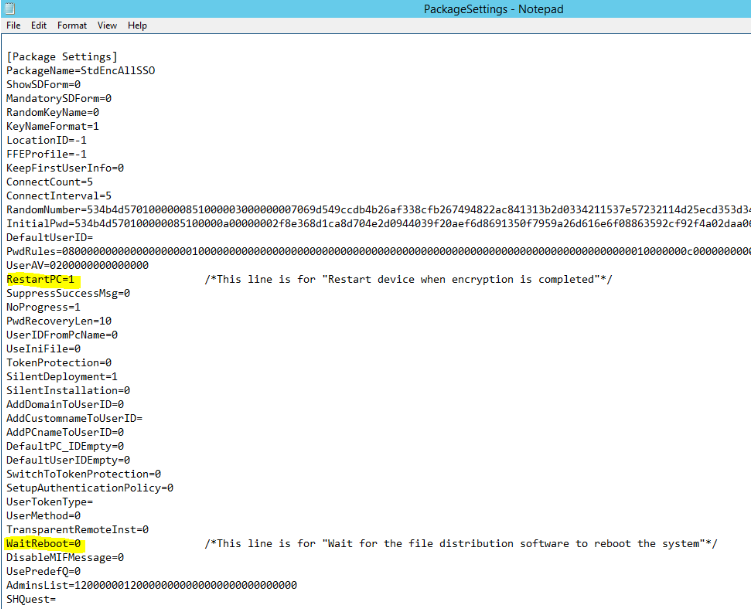
If the option "Wait for the file distribution software to reboot the system" is used, change the contents of the PackageSettings.ini file directly (as shown below) to de-couple these two options to in order to ensure these options are set intentionally and independently until a solution becomes available in a future version.
To do this, alter the contents of the installation package's PackageSettings.ini file.
The two options are highlighted in the image below.
Option "RestartPC=" value should be 1 if you intend to permit SecureDoc to automatically reboot the computer intial encryption has completed, or 0 if you wish to allow the user to reboot the computer at a convenient time. 1 is the normal default value for this option.
Option "WaitReboot=" value should be 0 if you do not wish to allow a software installation product (e.g. SCCM, SMS, GPO, LanDesk, Tivoli, GPO) to reboot the computer after the Pre-Boot Logon element has been integrated into the boot order, or 1 if you do wish to permit this. 0 is the normal default value for this option.
Article Document |
Title | How to decouple Reboot following installation of Pre-Boot from Reboot following completion of initial encryption. Work-around for V6.5 |
URL Name | How-to-decouple-Reboot-following-installation-of-Pre-Boot-from-Reboot-following-completion-of-initial-encryption-Work-around-for-V6-5 |